Keep your field names when you switch address API
If your form and your server code already read fields called address1, city or postcode, you can keep those names. Save them on an API key in the console, and the API returns each address under them. The reference entry is in the docs.
What it does
An owner or admin sets field names for an API key in the console. The key’s responses then carry a fields object. Its keys are your names and its values are the address parts you matched them to.
- Every standard field is still there and unchanged. Code that reads
formattedorcomponentskeeps working. fieldsis on retrieve, on each suggestion in an autocomplete withdetail=full, and insidematchin a verify response.- You choose which of those three calls carry it. All three are on by default.
- It changes nothing that is billed.
- It works on any key that is not revoked: secret or publishable, live or test.
Set it up in the console
- Sign in to the console as an owner or admin.
- Open Add to your form, just below API Keys. Every key that is not revoked is listed, with how many form fields it has.
- Press Add form fields on the key your server uses. If the key already has some, the button says Modify.
- Next to each address part, type the name your form or your code uses. Leave the rest blank. Start from a common form fills in
address1,address2,city,stateandpostcodefor you to change. - Under Which API calls carry these fields, tick the calls you want. All three are ticked by default.
- Before you save, you can press Generate sample response. It uses built-in sample data, makes no request and bills nothing.
- Press Save. The change reaches the API within about a minute.
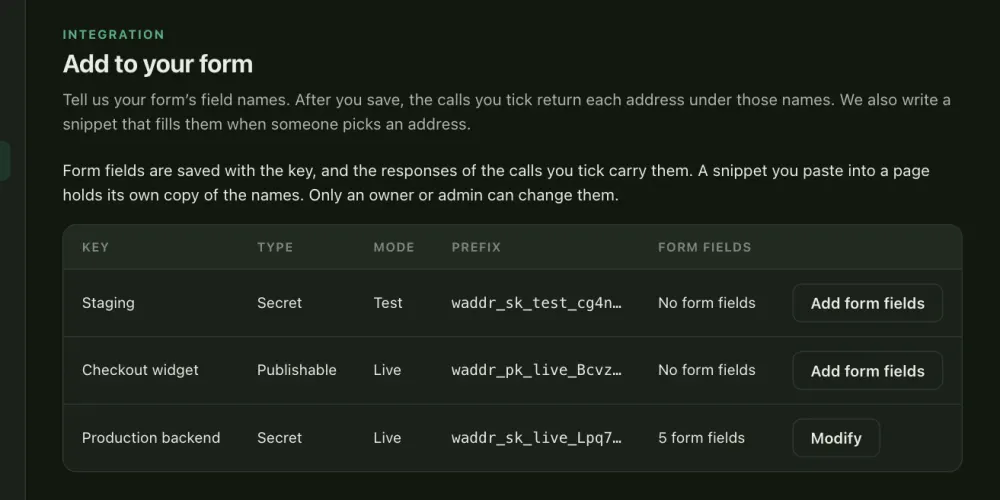
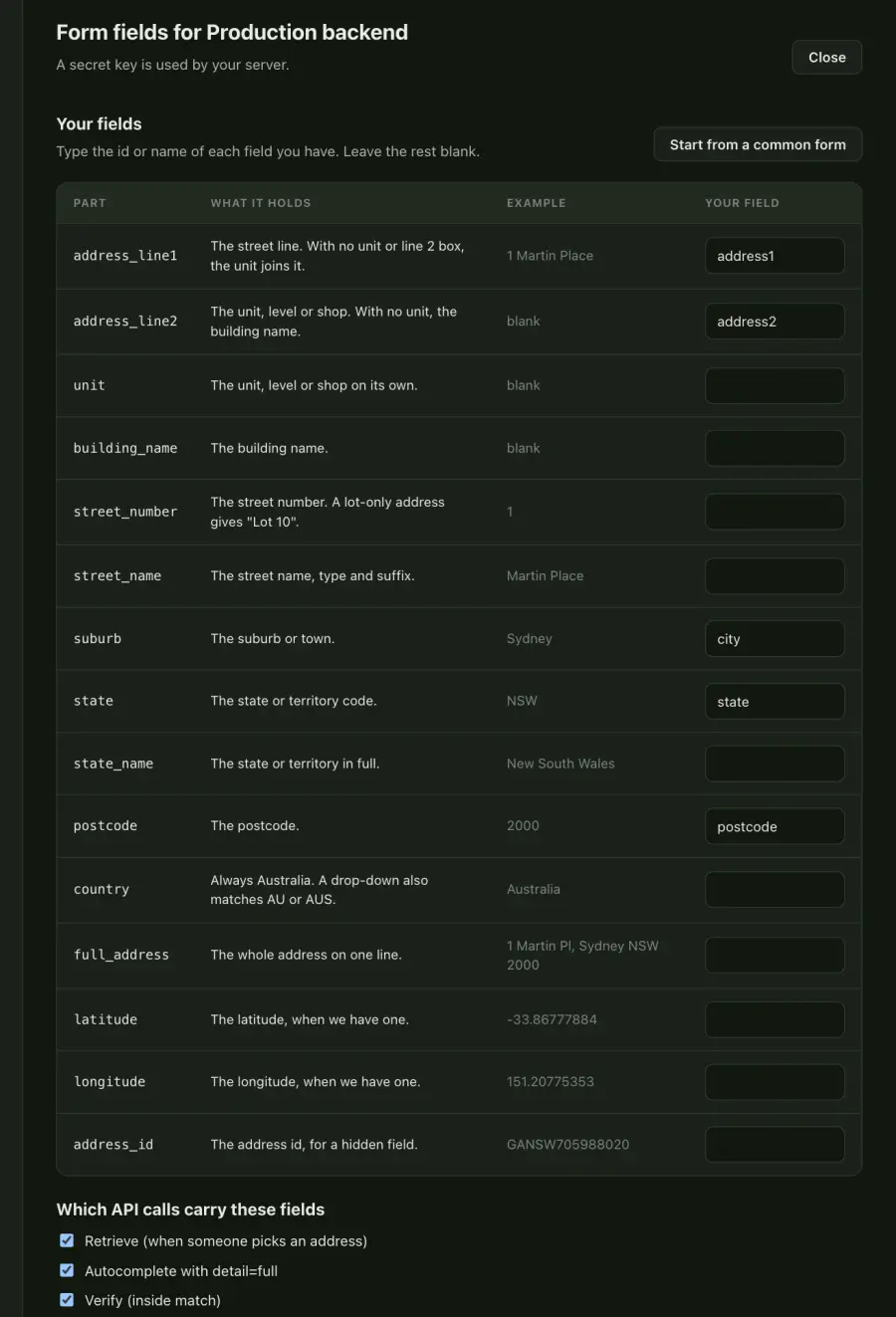
Only an owner or admin can save, change or remove form fields. Other roles can open the page, look at the fields and preview them.
The response before and after
The example address is made up for this page. Here is a retrieve response for a key with no form fields. The components object is trimmed, and geo and confidence are left out.
"id": "GANSW000000001",
"formatted": "Unit 5, 23 Smith St, Newtown NSW 2042",
"components": { … trimmed },
"source": "gnaf",
"gnaf_release": "2026-08",
"billed": true
}
Now the same call for a key that maps address_line1 to address1, address_line2 to address2, suburb to city, and state and postcode to the same names. Everything above is still there. The fields object is new.
"id": "GANSW000000001",
"formatted": "Unit 5, 23 Smith St, Newtown NSW 2042",
"components": { … trimmed },
"fields": {
"address1": "23 Smith Street",
"address2": "Unit 5",
"city": "Newtown",
"state": "NSW",
"postcode": "2042"
},
"source": "gnaf",
"gnaf_release": "2026-08",
"billed": true
}
These are the rules for what goes in fields.
- Every name you saved is in the object. A part the address does not have is an empty string.
- Every value is a string, including
latitudeandlongitude, as a form holds them. - The object is flat. It does not nest.
- With no
unitand noaddress_line2mapped, the unit joins line 1. For this address,address_line1alone gives"5/23 Smith Street". - With
address_line2mapped, line 1 is"23 Smith Street"and line 2 is"Unit 5". An address with no unit gets its building name there, if it has one, and otherwise an empty string. - With
unitmapped as well, the unit goes tounit. For an address with a unit, line 2 is then an empty string.
Choose which calls carry it
Under Which API calls carry these fields, tick any of these. All three are ticked by default. The console needs at least one tick to save.
| Tick | Where fields appears |
|---|---|
| Retrieve | At the top level of GET /v1/addresses/{id}. |
Autocomplete with detail=full | On each suggestion. The full-detail guide explains that mode and how it is billed. |
| Verify | Inside match. When there is no match, there is no fields. |
A call that you leave unticked returns exactly what it returned before.
Use the same fields on other keys
Form fields belong to one key. To use them on your other keys, press Save and apply to other keys in the editor. A confirmation appears. It says the API responses for the other keys will carry these field names within about a minute, and that keys with their own form fields will be replaced.
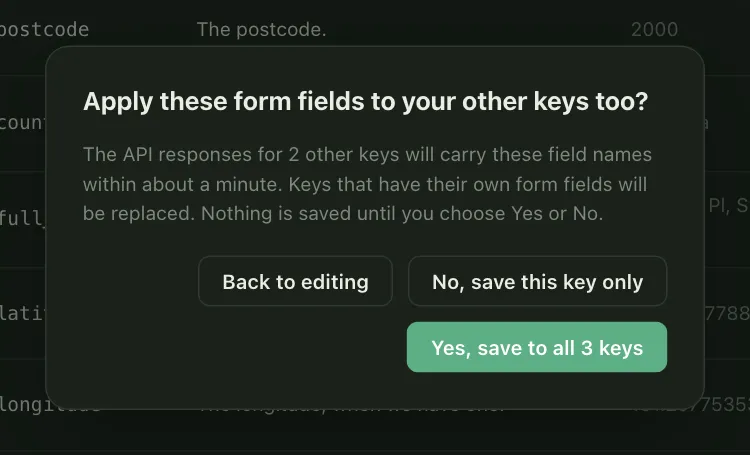
- Yes saves the fields to this key and every other key that is not revoked. The calls you ticked are copied too.
- No saves this key only.
- Back to editing closes the dialog and saves nothing.
To take form fields off a key, press Remove form fields and confirm. That key’s responses then stop carrying fields.
Rotating a key
When you rotate a key, the new key keeps the form fields and the ticked calls. You do not need to set them again.
Limits
- Only an owner or admin can save, change, remove or apply form fields.
fieldsis not on bulk verify, reverse geocoding or suburb and postcode calls.- Values are strings. A part the address does not have is
"". - A name can be up to 100 characters. Control characters are refused, and so are the names
__proto__,constructorandprototype. - Two parts cannot share one name. The console refuses the save and says so.
- A change reaches the API within about a minute.
- In a workspace billed through Shopify, the Shopify app handles your checkout. The Add to your form page says so, and is for your other sites.
Billing
Saving form fields does not change what any call costs or how it is counted. fields is worked out from the record the call already returns. There is no extra call and no extra lookup.
The browser widget
The console page also writes a snippet for the browser widget. It fills your form fields when someone picks an address, using the same names. The widget’s fill option and the parts are described in the widget section of the docs.