Autocomplete with full detail
Add detail=full to an autocomplete call and each suggestion carries the full address record. You do not need a retrieve call. The price per lookup is the same, but the way a search is billed is different, so read the cost section first. The reference is in the docs.
detail=full, and the default two calls stay the cheapest.What it returns
GET /v1/addresses/autocomplete?q=&session=&detail=full returns up to 5 suggestions. Each one has id, formatted and score, plus the record a retrieve would return for that id: components, geo, confidence, source and gnaf_release. The response also carries billed, and test: true on a test key.
session is required. Without it the call is a 400.
A sample call
The shape of this request and these responses comes from the API’s own route code, run on a sample record with a live key on a workspace that has the option switched on. The only editing is the trimming marked below.
"https://api.wattleaddr.com.au/v1/addresses/autocomplete?q=33+hib&session=abc123&detail=full"
Sample response. The score and coordinates are placeholders; a real call returns the address’s own. The first call in a new session returns the record and bills the session as one lookup, so billed is true:
"session": "abc123",
"query": "33 hib",
"suggestions": [
{
"id": "GAACT717000002",
"formatted": "Shop 29, 33 Hibberson St, Gungahlin ACT 2912",
"score": 40,
"components": {
"flat_number": "29",
"level_number": null,
"street_number": "33",
"street_name": "Hibberson",
"street_type": "Street",
"street_suffix": null,
"locality": "Gungahlin",
"state": "ACT",
"postcode": "2912",
"lot_number": null,
"flat_type": "Shop",
"level_type": null,
"building_name": null
},
"geo": {
"lat": -35.3,
"lng": 149.1
},
"confidence": "high",
"source": "gnaf",
"gnaf_release": "2026-08"
}
],
"billed": true
}
The same call again in the same session returns the same suggestions and billed is false. This is the second response, trimmed: components, geo, confidence, source and gnaf_release are the same as above and are left out here.
"session": "abc123",
"query": "33 hib",
"suggestions": [
{
"id": "GAACT717000002",
"formatted": "Shop 29, 33 Hibberson St, Gungahlin ACT 2912",
"score": 40,
"components": … the same as the first response
}
],
"billed": false
}
Which one to use
| Default: autocomplete, then retrieve | Full detail: detail=full | |
|---|---|---|
| Calls | Autocomplete as people type, then one retrieve for the address they pick. | Autocomplete only. The record is in the suggestion. |
| Price per lookup | The published price. | The same published price. |
| What is one lookup | A session that ends in a retrieve. | A session the first time it returns at least one suggestion. |
| Abandoned search | Not billed. | Billed. |
| Suggestions per call | 1 to 20. | At most 5. |
| Who can switch it on | Always available. | An owner or admin, in the console. Off by default. |
| Plans | All. | All, including Free. Not Shopify plans. |
Use full detail when you want to store the address straight from the suggestion and a second call is awkward for your code. Stay on the default when many searches are abandoned, or when you want the lowest bill.
How it is billed
- A full-detail search session is one lookup the first time it returns at least one suggestion, whether or not anyone picks one.
- Later calls in that session, and a retrieve in it, are usually not billed again.
- A session covers calls for up to 10 minutes, and up to 50 calls that return suggestions, counting the call that was billed, after it is first billed. After that, the next call that returns a suggestion is a new lookup.
- A call that returns no suggestions is not billed.
- It uses the same monthly allowance, overage and ceiling as every other lookup.
- A full-detail call is refused, with nothing charged, whenever your workspace’s billable requests are refused under quotas and overage, even in a session already billed. Default autocomplete keeps working.
- Test keys are never billed.
A worked example
This is an example with numbers we chose. It is not a measured figure, and your abandonment share will differ. Count how many of your searches end without a pick before you decide.
Say you are on Starter ($53.90 a month including GST, 50,000 lookups included, then $2.75 per 1,000 including GST). In a month, 70,000 searches end in a pick. In this example, 30% of searches that show suggestions are abandoned, so 100,000 searches show suggestions.
| Lookups billed | Monthly bill | |
|---|---|---|
| Default two calls | 70,000 | $108.90 |
| Full detail | 100,000 | $191.40 |
With no abandoned searches the two would cost the same. The more searches are abandoned, the larger the gap.
Switching it on
- Sign in to the console as an owner or admin.
- Open Settings. In the Full-detail autocomplete box, tick Allow full-detail autocomplete and press Save. It is off by default.
- Add
detail=fulland asessionto your autocomplete call.
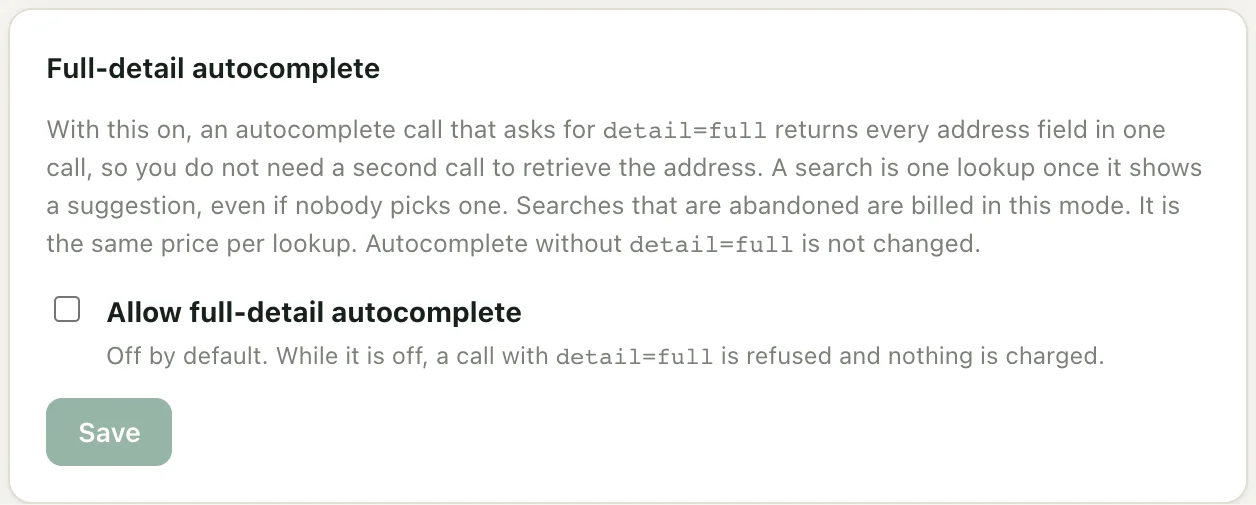
While it is off, detail=full returns 403 and nothing is charged. The widget, the SDK widget, Shopify and WooCommerce keep using autocomplete and retrieve, so their bills do not change.
More
- The reference section in the docs
- Pricing
- Terms of Service, under Plans, usage and metering