Getting started with the Australian address API
WattleAddr adds an address box to your website or app. As someone types, it suggests real Australian addresses. When they pick one, you get it back in separate fields: street, suburb, state, postcode and coordinates.
Step 1: Get an API key
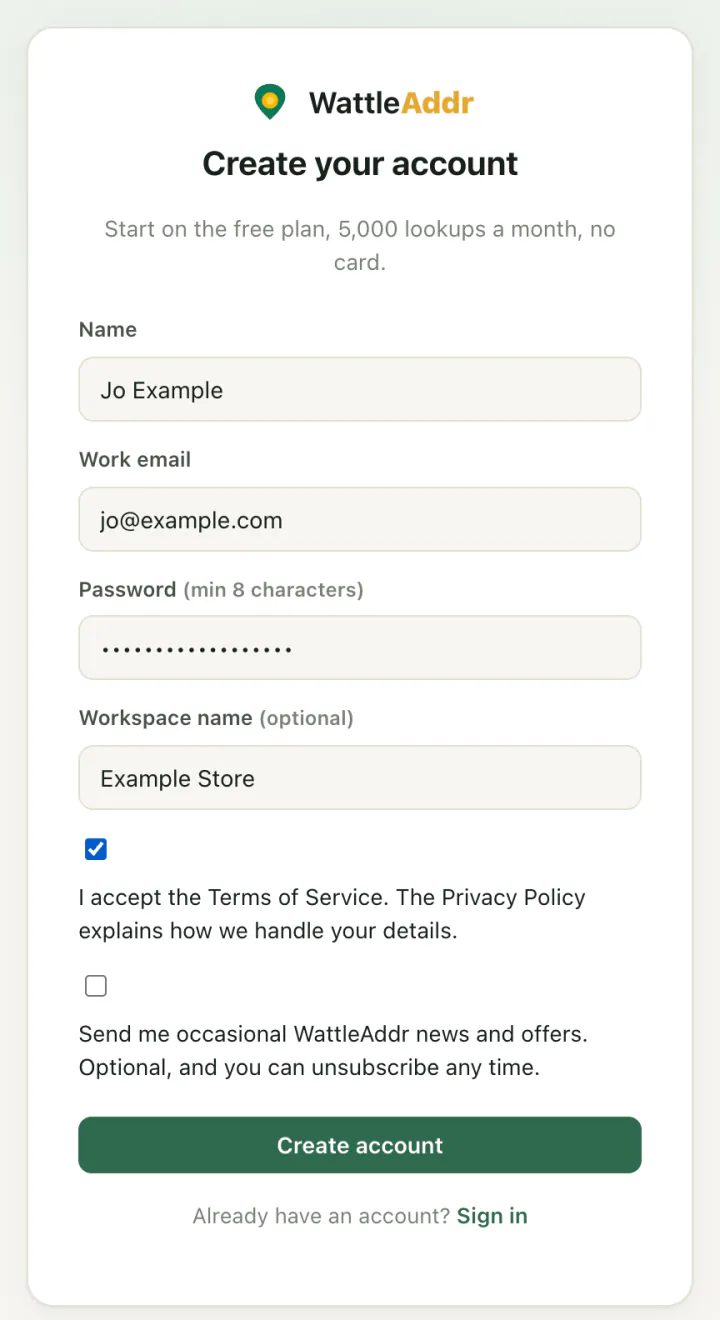
1. Create an account. Go to the sign-up page. Enter your name, work email and a password, tick the box to accept the Terms, then press Create account. You start on the Free plan: 5,000 lookups a month, no card.
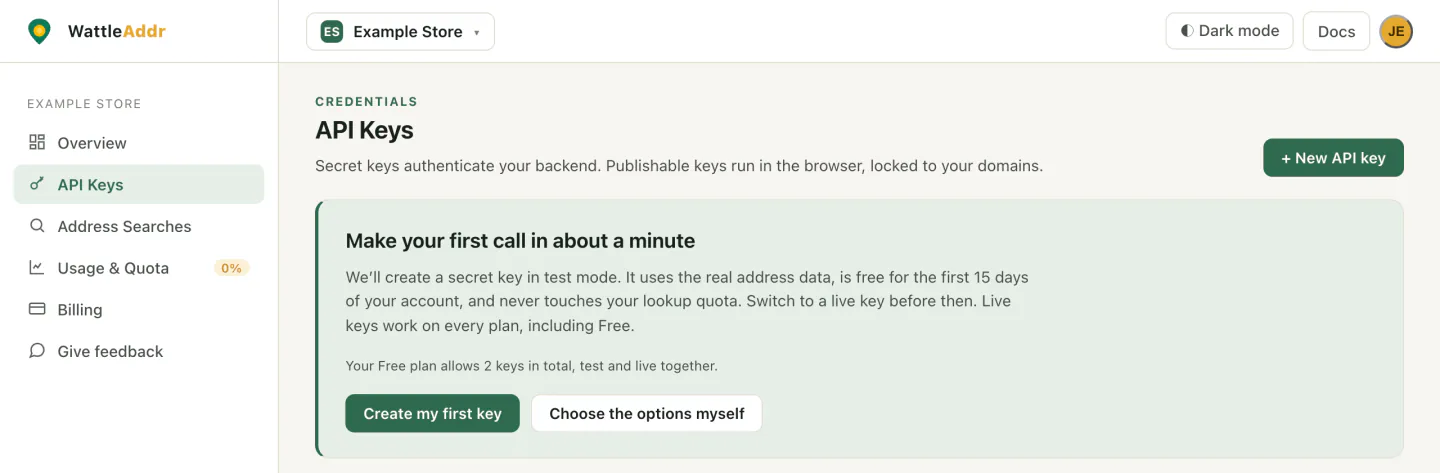
2. Create your first key. The console opens on your new workspace. Open API Keys in the left menu and press Create my first key.
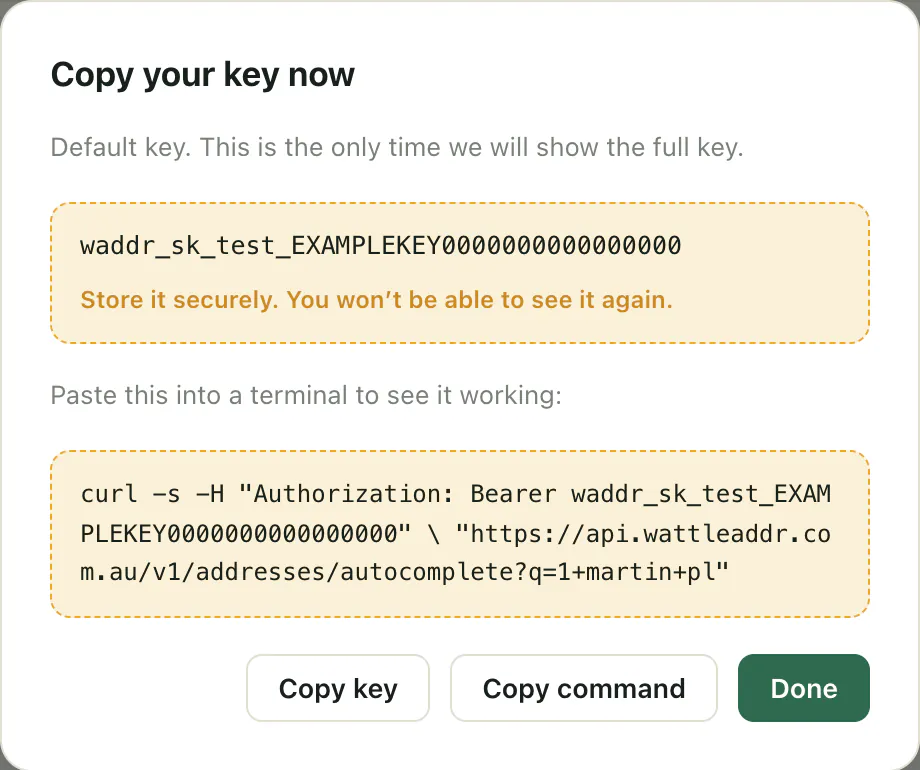
3. Copy the key. You get a secret key in test mode, starting waddr_sk_test_. The console shows it once, under Copy your key now. Copy it somewhere safe. Test mode uses the real address data. It costs nothing and does not count against your 5,000 monthly lookups. It works for the first 15 days of your account.
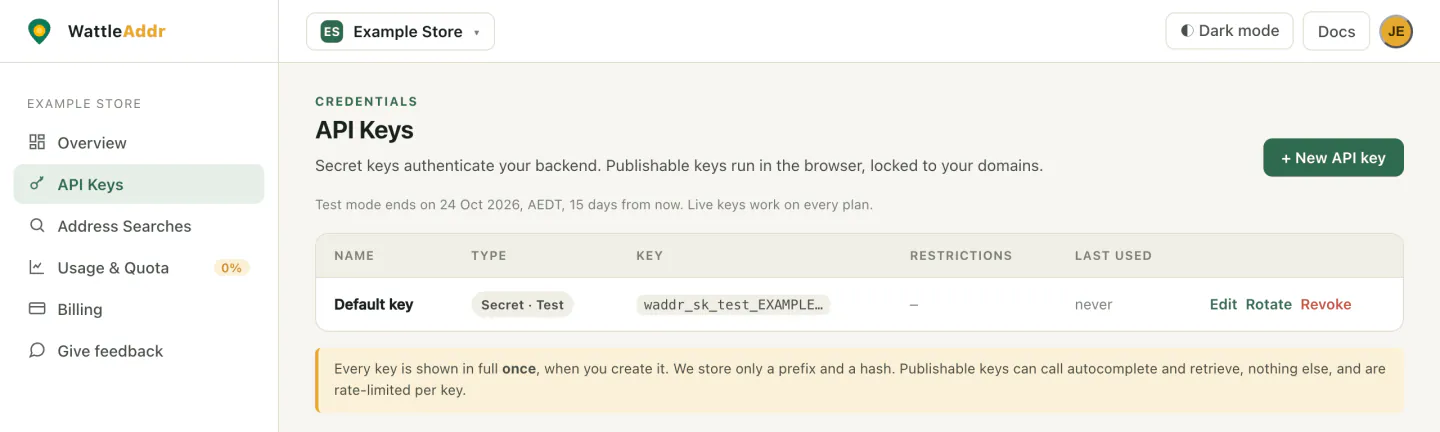
The key then appears in your list. Only its first few characters are shown from now on.
Which key do I need?
To pick the key yourself, press Choose the options myself (or + New API key once you have one). Choose:
- Secret (server) for code that runs on your server. Never put a secret key in a web page or a public repository.
- Publishable (browser) for code that runs in a web page. A live publishable key must list the domains it may run on.
- Live or Test. Test keys stop after the 15-day test period. Live keys work on every plan, including Free. The one exception is the suburb and postcode API, which needs a paid plan on a live key.
Step 2: Try it without code
Open the interactive reference. It needs no key. Type an address and you see the request and the JSON that comes back. Click a suggestion to fetch its full record.
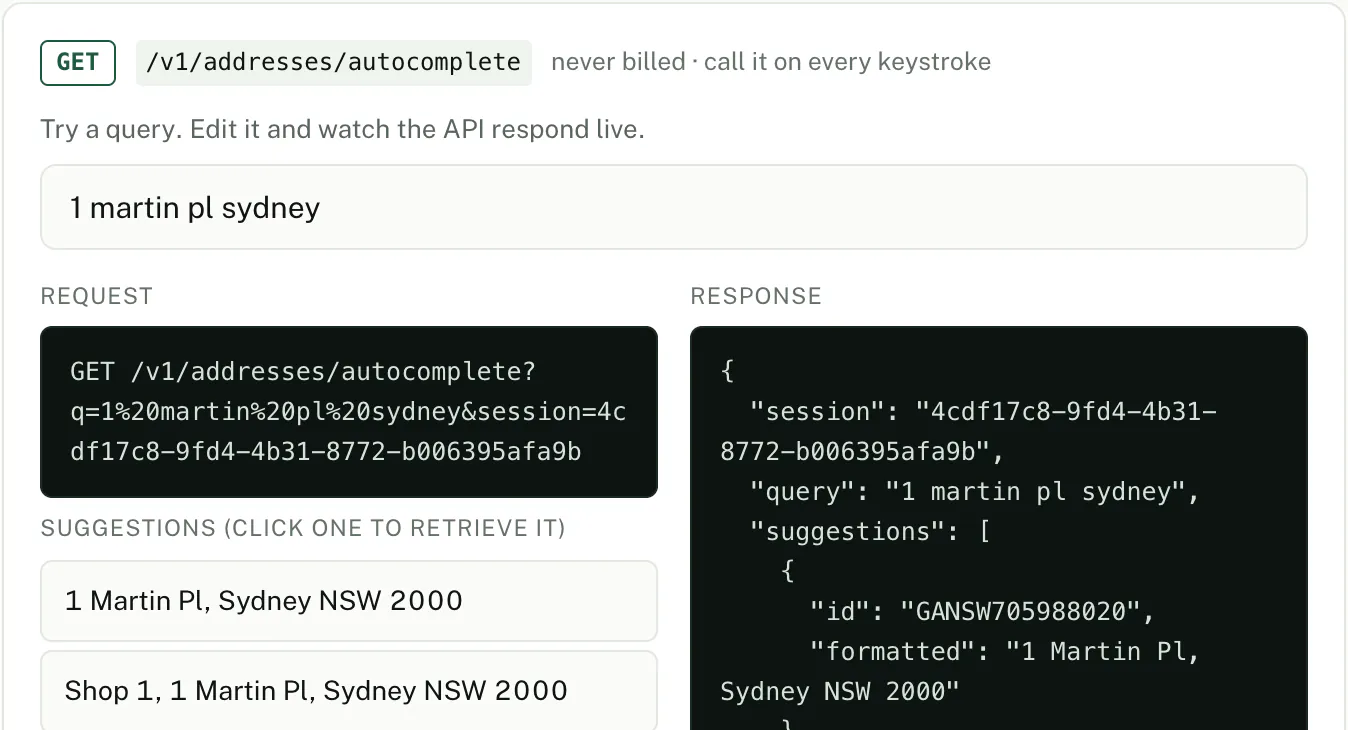
1 martin pl sydney.You can also take the OpenAPI 3.1 spec or the Postman collection into your own tools.
Step 3: Add it to your site
In the browser, use a publishable key (waddr_pk_…). In the console, press Choose the options myself or + New API key, pick Publishable (browser), and list your website’s domain. Test mode is fine while you build.
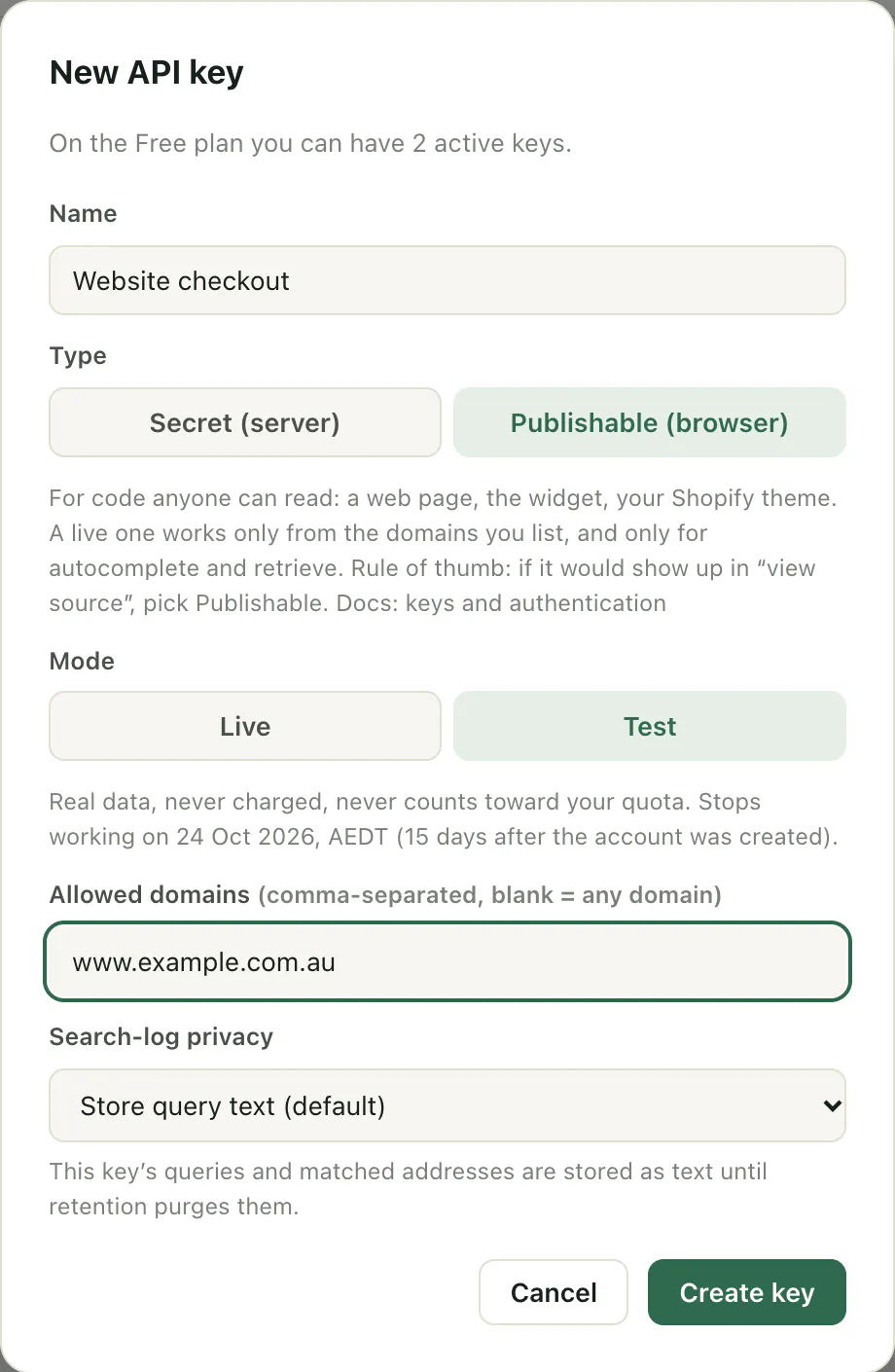
The widget and the React component handle the session for you. With the headless client, create one with createSession() and pass it to each call. All the keystrokes behind one address count as a single lookup.
Option A: the browser widget (one script tag)
No build step and no dependencies. Paste this into your page, with your publishable key in place of waddr_pk_live_….
<script src="https://api.wattleaddr.com.au/v1/widget.js"></script>
<script>
const wa = new WattleAddr('waddr_pk_live_…');
wa.attach('#address', {
onSelect: (a) => console.log(a.formatted, a.components, a.geo)
});
</script>
As someone types, the widget shows suggestions under the box:
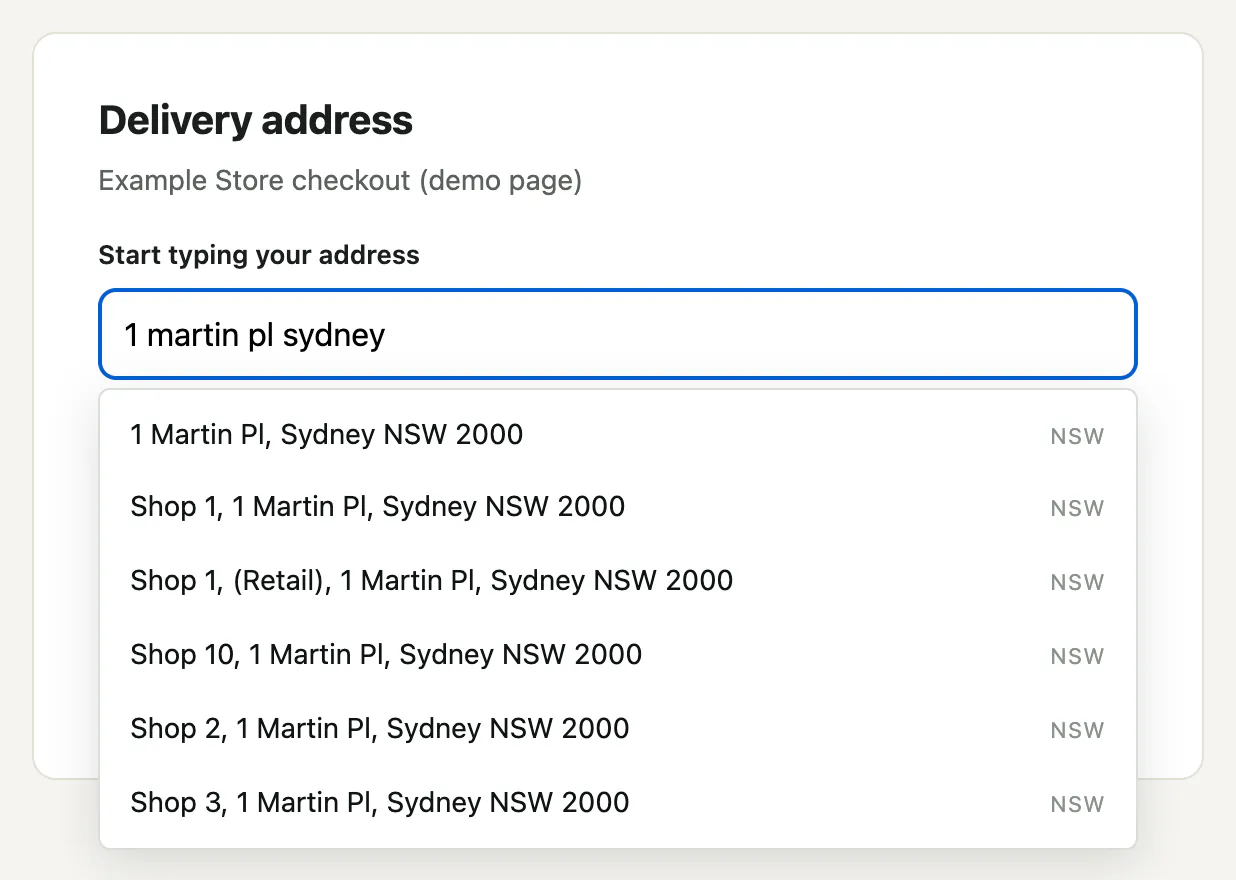
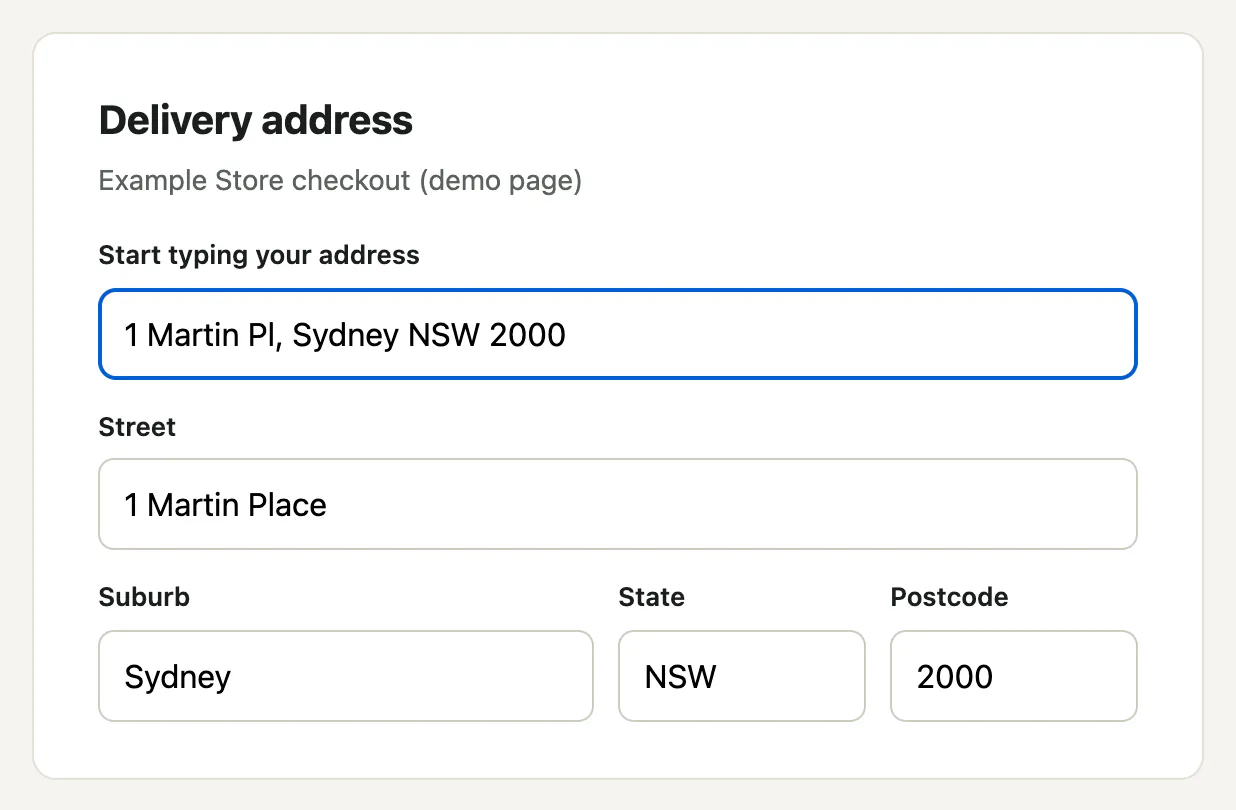
When they pick one, onSelect gets the full address. In this example page, onSelect copies a.components into separate fields:
const c = a.components;
document.querySelector('#street').value = [c.flat_number ? c.flat_number + '/' + c.street_number : c.street_number, c.street_name, c.street_type, c.street_suffix].filter(Boolean).join(' ');
document.querySelector('#suburb').value = c.locality;
document.querySelector('#state').value = c.state;
document.querySelector('#postcode').value = c.postcode;
}
| Option | Default | What it does |
|---|---|---|
onSelect | none | Called with the full record once someone picks an address. |
onError | console warning | Called instead of logging, if you want to handle failures yourself. |
theme | light | light, dark, or auto to follow the visitor’s system setting. |
limit | 6 | How many suggestions to show. |
state | all | Restrict to one state, for example NSW. |
Option B: the npm packages (React or Node)
Official, typed, MIT-licensed packages. Use @wattleaddr/react for React. Use @wattleaddr/js (no dependencies) for plain JavaScript or server-side Node.
npm install @wattleaddr/react
# Vanilla JS / Node: headless client + the same drop-in widget
npm install @wattleaddr/js
The React component drops into any form:
<AddressAutocomplete
apiKey="waddr_pk_live_…"
onSelect={(a) => console.log(a.formatted, a.components.postcode)}
/>
Or use the client with no UI. It runs in the browser and in Node 18+. On a server, set keyTransport: 'header' so a secret key is sent as a Bearer token and not in the URL:
const client = new WattleAddrClient('waddr_sk_live_…', { keyTransport: 'header' });
const session = createSession();
const { suggestions } = await client.autocomplete('1 mart', { session });
const addr = await client.retrieve(suggestions[0].id, { session }); // the charged call
Worked examples: a React form, a Next.js App Router form and a checkout with the widget.
Step 4: Get the full address from your server (about 5 minutes)
This is what the widget does for you, as two plain HTTPS calls. Use it from a server, or try it in a terminal with curl. Replace YOUR_KEY with your secret key.
a. Ask for suggestions as someone types
Pick any unique string as the session. Reuse it for every request about this one address. Suggestions start from three characters. Autocomplete keystrokes are fair use and are not billed on their own.
"https://api.wattleaddr.com.au/v1/addresses/autocomplete?q=1+martin+pl&session=demo-1"
"session": "demo-1",
"query": "1 martin pl",
"suggestions": [
{ "id": "GANSW706124693", "formatted": "1 Martin Place, Sydney NSW 2000", "score": 42.66 }
]
}
The -H line sends your key in the Authorization header. A secret key is always sent that way. In the response, id is the address’s identifier in G-NAF, the national address dataset (see Words we use). formatted is the text to show in your list. score only ranks suggestions within this one response, and you can ignore it. Show the list and let the person pick one.
b. Retrieve the one they picked
Use the same session. This is the charged call. One session is one lookup, however many keystrokes it took.
"https://api.wattleaddr.com.au/v1/addresses/GANSW706124693?session=demo-1"
"id": "GANSW706124693",
"formatted": "1 Martin Place, Sydney NSW 2000",
"components": {
"flat_number": null, "level_number": null,
"street_number": "1", "street_name": "Martin", "street_type": "Place", "street_suffix": null,
"locality": "Sydney", "state": "NSW", "postcode": "2000"
},
"geo": { "lat": -33.8678, "lng": 151.2073 },
"confidence": "high",
"source": "gnaf", "gnaf_release": "2026-08",
"billed": false, "test": true
}
Here is a live call in the interactive reference:
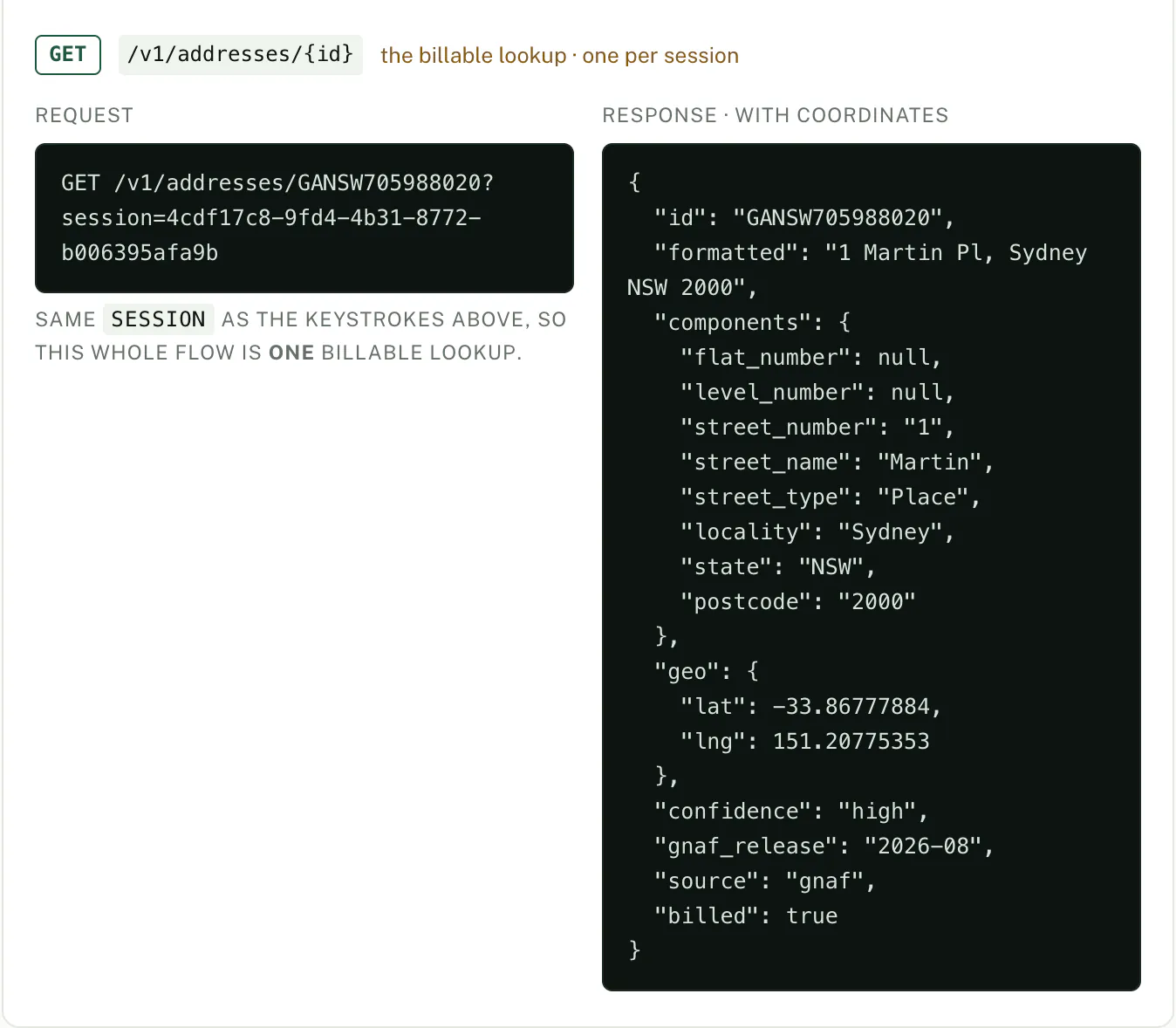
| Field | What it is |
|---|---|
components | The address in parts. All strings, any may be null. locality is the suburb or town. Keep postcode as a string: Darwin is 0800. |
geo | Latitude and longitude, or null if the record has no coordinates. |
confidence | G-NAF’s own confidence in this record. Not a match score. |
gnaf_release | The quarterly dataset that answered. Store it with the address. |
billed | Whether this call used one lookup from your plan. false on a test key. |
test | Present, and true, only on a test key. Nothing is ever charged on one. |
c. What you were charged
Nothing, on a test key. That is what "billed": false and "test": true mean. On a live key the same two calls use exactly one lookup, for the retrieve, and billed comes back true. The keystrokes are not billed because they shared the session. If you leave the session out, every retrieve is charged on its own.
On a plan with a quota, every successful response also carries X-WattleAddr-Quota-Limit and X-WattleAddr-Quota-Remaining headers. On a live key you can watch your monthly allowance drop by one.
d. Save the address
Store id, formatted and components together. Ids can change between G-NAF releases, so never keep the id on its own. There is a schema to copy in how to store an Australian address. The address format checker shows how a messy address splits into these fields.
Before you go live: create a Live key. Test keys stop working after the test period with 402 test_mode_expired. Live keys work on every plan, including Free. The one exception is the suburb and postcode API, which needs a paid plan on a live key.
Step 5: What you pay, limits and errors
You pay per lookup. Send the same session with each autocomplete keystroke and the final retrieve, and the whole session counts as one lookup. Autocomplete on its own is not billed. A retrieve or verify with no session is always charged, so always send one. A verify that finds no match is not charged. Suburb and postcode search is billed differently. See Suburb, state and postcode.
Plan allowances and prices are on the pricing page. When the monthly quota is used up, the Free plan, plans bought through the Shopify app, and a paid plan you have cancelled return 402 quota_exceeded on charged calls. Other paid plans keep working and bill overage at the rate on the pricing page, up to a ceiling where they also return 402.
Rate limits and speed
Each key has a requests-per-second limit set by its plan. A key can send that many requests at once, then continue at that rate. Over it, the API returns 429 rate_limited with a Retry-After header saying how many seconds to wait. Nothing is queued. A refused request is not counted or charged.
| Plan | Requests per second, per key | Live keys per workspace |
|---|---|---|
| Free | 5 | 2 |
| Starter | 15 | 10 |
| Growth | 40 | 25 |
| Enterprise | 200 | 1,000 |
There is no separate concurrency limit. Parallel requests are fine within the per-second rate. Each key has its own limit, so use one key per system. If one system needs more than its plan’s rate, talk to us instead of spreading it across keys. Limits above the published ones are set by agreement. Test keys have a separate, smaller allowance. Monthly volume is set by the plan’s quota (above).
Speed. Measured inside the API in September 2026: autocomplete about 65 ms at the median and about 225 ms at the 95th percentile. Verify takes 35 to 100 ms once a query is warm, and up to about 600 ms on the first call for a large block of units. A fresh HTTPS connection from within Australia adds roughly 50 to 90 ms, and a reused one about 45 ms, so keep connections open. Repeated prefixes are served from an in-memory cache. Live availability and the G-NAF release being served are on the status page.
How it runs. The full G-NAF release is loaded into OpenSearch by the open-source Addressr loader, which we host. Our API queries it directly: the exact query first, and a spelling-tolerant one only when that finds nothing. The same API handles keys, metering, scoring and the corrections described below. Keys, usage and billing are in Postgres. Sydney is primary and Melbourne is a warm standby. Quarterly G-NAF releases are loaded in place with no downtime.
Common errors
Every error is JSON: { "error": { "code", "message", "docs" } }. Switch on code, which does not change. The message may change. The docs link points at the matching row of the full error reference, which lists every code. These are the ones you are most likely to see first:
| Status | code | What happened | What to do |
|---|---|---|---|
| 401 | unauthorized | No API key was sent. | Add an Authorization: Bearer YOUR_KEY header (secret key), or ?key= for a publishable key in the browser. |
| 401 | invalid_key | The key is wrong, has been revoked, or has a typo. | Copy it again from the console, or create a new key. Revoked keys never come back. |
| 402 | quota_exceeded | This month’s lookups are used up and your plan does not run over (Free, Shopify, a cancelled plan, or a paid plan with a spending cap set at your request), or a paid plan has reached the overage ceiling of five times its included lookups. The message says which. | Upgrade in the console under Billing, or wait for the period to roll over. If the message says the overage ceiling was reached, contact support to lift it; a plan change only takes effect next period. Address autocomplete keeps working. Suburb and postcode autocomplete is refused too, because it can be charged. |
| 402 | test_mode_expired | A test key was used after the free test period (15 days from account creation). | Create a Live key in the console. Live keys work on every plan, including Free. The one exception is the suburb and postcode API, which needs a paid plan on a live key. |
| 403 | forbidden_referrer | A publishable key was used from a domain that is not on its allowed list. | Edit the key in the console and add the domain to Allowed domains. Match the exact host the page is served from. |
| 429 | rate_limited | Too many requests per second on one key. For the Property API, it can also mean more than 1,000 property requests from one workspace could not be answered in a day. | Wait the number of seconds in the Retry-After header, then retry. Debounce keystrokes in the browser. For the Property API daily limit, check the addresses you are sending. It resets at midnight Sydney time. |
Not an error: 200 with "suggestions": [] and a notice. See PO Boxes below.
Reference
Keys and authentication
There are two key types, both created in the console. Never expose a secret key in the browser.
| Key | Prefix | Where | Secured by |
|---|---|---|---|
| Secret | waddr_sk_live_… | Server-side | Authorization: Bearer + optional IP allowlist |
| Publishable | waddr_pk_live_… | Browser (autocomplete and retrieve only) | The website domains you list + rate limits |
Either type can be made in test mode (waddr_sk_test_…, waddr_pk_test_…). Test keys use real data, are never charged, and work for the first 15 days of an account. Responses from a test key carry "test": true.
Keys are how your application signs in. How your team signs in to the console is separate. On Enterprise plans you can connect the console to your own identity provider over OpenID Connect, and require it. See single sign-on setup.
Endpoints
Base URL https://api.wattleaddr.com.au/v1. JSON only. Australian addresses only.
| Method | Path | Purpose |
|---|---|---|
GET | /v1/addresses/autocomplete | Type-ahead suggestions for a partial query |
GET | /v1/addresses/{id} | Full structured record for a chosen suggestion (charged) |
POST | /v1/addresses/verify | Match free text to its official G-NAF form, with a verdict for each field (charged on a match) |
GET | /v1/localities/autocomplete | Suburb or postcode suggestions (charged once per session, on the first suggestion) |
GET | /v1/localities/{id} | One suburb, state and postcode pair (free inside a session already charged) |
POST | /v1/localities/verify | Check that a suburb, state and postcode belong together (charged when there is a match) |
GET | /v1/status | Service health & current G-NAF release |
Every parameter and response schema is in the interactive reference.
Verify an address you already hold
There is a plain-language overview of verification, and what it is not, on the verification page.
verify takes free text you already hold. It returns the best match in its official G-NAF form, plus an assessment of how well it answers what you sent. Branch on verdict.
-H "Authorization: Bearer YOUR_KEY" \
-H "Content-Type: application/json" \
-d '{"address": "23 wakool ave deer park", "session": "demo-2"}'
"matched": true,
"match": { /* the full record, same shape as retrieve */ },
"verdict": "corrected",
"match_score": 75,
"match_level": "premise",
"elements": { "street_number": "verified", …, "postcode": "missing" },
"changed_elements": [],
… plus alternatives, source, gnaf_release, billed and, on a test key, test
}
verdict | Meaning | Handling |
|---|---|---|
verified | Every element you supplied agrees, and no other candidate fits | Accept |
corrected | Agrees as far as it goes. You abbreviated or left something out | Accept the official form, or ask again for the missing elements you need. A street suffix left out (“Station St” for Station St West) also reads corrected. missing means not supplied, not required: a house has no unit |
ambiguous | An element was contradicted, input was discarded, a runner-up fits equally well, or you gave a building address and the building has units (the alternatives list them) | Review. Never accept automatically. If your data is deliberately at building level, accept on match_level: premise and check alternatives |
unverified | Nothing matched, or the match scored too low to rely on. If reaching the candidate meant contradicting or discarding part of what you sent, no record is returned (matched: false, match: null) and the lookup is not billed. elements, match_score and dropped_tokens still say why. A short input that contradicts nothing (a suburb and postcode, say) still returns its locality-level record | Reject and flag |
elements gives every field its own status (verified, changed or missing). A checkout can then ask again for the one wrong field, not the whole address. match_level says how precisely we identified it: subpremise a unit, premise a building, thoroughfare the street only, locality the suburb only. It is independent of the verdict. When you supply no unit or level, verify prefers the building over its units. Supply the unit to get subpremise.
We publish no accept or reject score threshold. The right line depends on what a wrong address costs you. The older top-level confidence field on a verify response is deprecated. Branch on verdict. A verified address exists in G-NAF and we know where it is. That is not a promise that mail can be delivered to it. There is a worked example of verifying on the server, without paying twice, in the Next.js guide.
Typos, misspellings and units
Matching is fuzzy but not phonetic. A word of three to five letters may have one character wrong, missing, extra or swapped. A longer word may have two. A word of one or two letters must be exact. That applies to the street name and the suburb alike, with one exception: the last word typed is treated as a prefix and gets no tolerance. So 589 Beems Rd Carseldine and 589 Beams Rd Carsledine QLD both find 589 Beams Rd, but a suburb misspelt at the very end of the query matches nothing on its own.
When nothing matches, the search is retried with something dropped. Verify reports what it discarded in dropped_tokens and scores the match lower. The street number goes first if the street and suburb you named exist and only the number does not. You then get the numbers that street does hold, nearest yours, with a street_number_not_found notice. Verify refuses that match and does not answer with a different number. Otherwise the trailing words (suburb, state, postcode) are dropped one at a time. A retry is never answered in a state or postcode your query contradicts. Suggestions appear once the query names a street or suburb. A bare unit, level or small street number on its own returns an empty list.
Verify never corrects a street number. A number that disagrees with the record is marked changed, not swapped. If the number had to be discarded to find anything at all, verify refuses. It will not answer about the house next door.
Autocomplete is looser, in this order. A one- or two-digit number is matched exactly, so if no premise carries it the suggestions are sub-dwellings that do (8 Beams Rd returns Unit 8 of the blocks on Beams Rd). A number of three or more digits gets the same one-character tolerance as a word, which can bring up a neighbour. Only when neither finds anything does the number itself get dropped. That means the street and suburb exist but that number is not in G-NAF. You then get that street’s real numbers, nearest yours, with a street_number_not_found notice saying so. When you type a number and no unit, the premise with that number on that street comes before anybody’s units. A building normally comes before its own units, even when the block is large. Type the unit (3/589, unit 3 589) to get the unit.
Verify tells you what it changed. elements marks each part verified, changed or missing. changed_elements lists the corrected ones, and the corrected values are in match.components. A corrected street name lowers match_score and gives an unverified or ambiguous verdict, never verified. So a misspelt street reaches you as the right record flagged for review, not as an automatic accept. A building address on a block with units matches the building with an ambiguous verdict and some of its units in alternatives.
PO Boxes & postal addresses
PO Boxes are not supported, because G-NAF holds physical addresses only. It has no PO Boxes, GPO Boxes, Locked Bags or Private Bags. A query for one returns 200 with an empty suggestions array and a notice. Your form can then ask for a street address, or take the PO Box in a separate field. verify returns the same notice with matched: false and billed: false. A query the dataset cannot answer is never charged. To validate PO Boxes you need a product licensed for Australia Post’s PAF. AMAS and PAF vs G-NAF explains the difference.
"code": "postal_address_unsupported",
"kind": "PO Box",
"message": "PO Box addresses aren’t in the G-NAF dataset…"
} }
Suburb, state and postcode
Three endpoints suggest suburbs and postcodes as someone types, and check that a suburb, state and postcode belong together. You can use them instead of building your own postcode list. They are included on Starter, Growth and Enterprise with a live key. On Free, test keys can use them during your account’s first 15 days. There is a shorter overview on the postcode API page.
-H "Authorization: Bearer YOUR_KEY"
"session": "demo-3",
"query": "north parra",
"suggestions": [{
"id": "NSW1234-2151",
"formatted": "North Parramatta NSW 2151",
"suburb": "North Parramatta",
"state": "NSW",
"postcode": "2151"
}]
}
This is an example. The id is made up, and real ids can change between G-NAF releases. A query of digits only searches postcodes. state and limit are optional. session is required, and without it you get 400 bad_request. Each suggestion already holds the suburb, state and postcode, so you do not need a second call to read them. Suburb search forgives a typo, but only when the first letter is right.
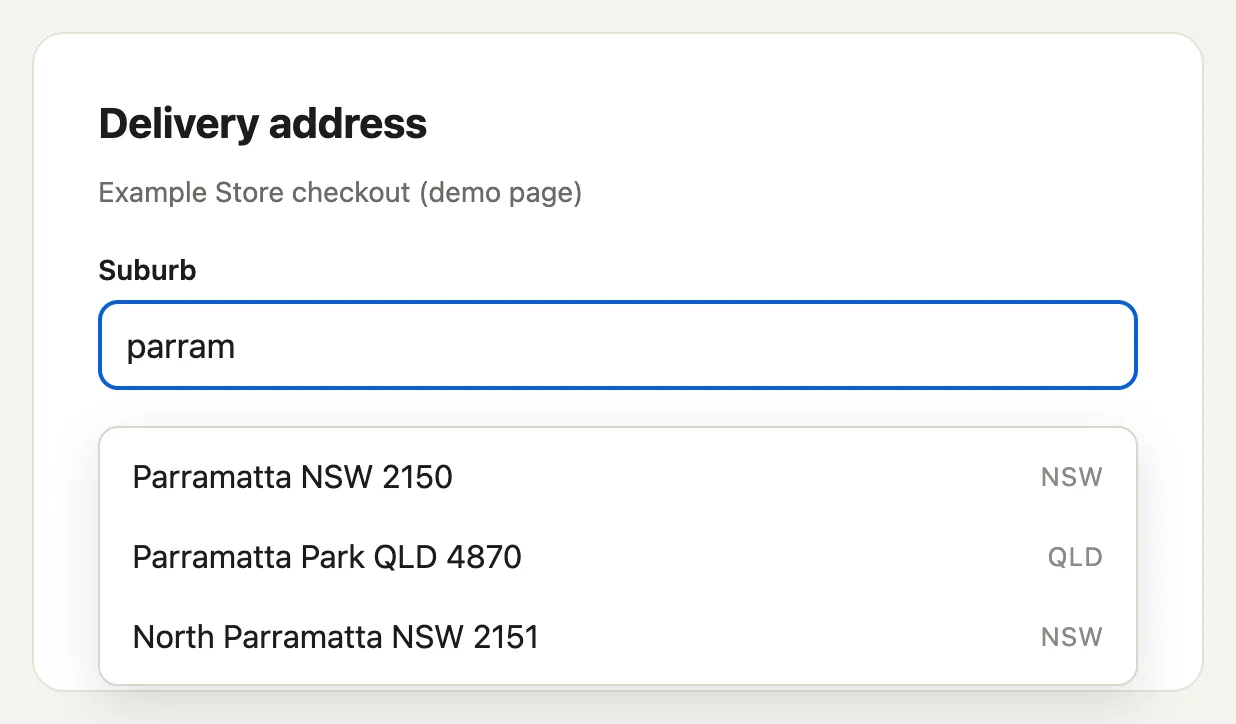
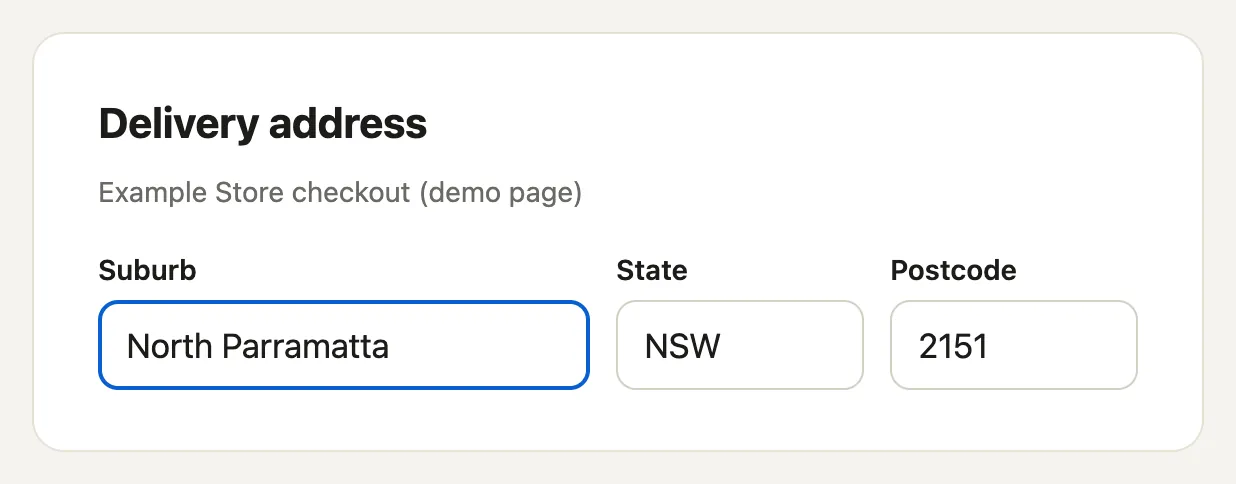
A suggestion carries the suburb, state and postcode, so filling a form needs no second call. There is no SDK helper for suburbs and postcodes, so call the endpoint with fetch. Use a publishable key in the browser, and one session for each search box.
async function suggest(q) {
if (q.trim().length < 2) return [];
const url = `https://api.wattleaddr.com.au/v1/localities/autocomplete?q=${encodeURIComponent(q)}&session=${session}`;
const res = await fetch(url, { headers: { Authorization: "Bearer YOUR_PUBLISHABLE_KEY" } });
if (!res.ok) return []; // a 402 means a Free live key or quota reached: fall back to a free-text field
return (await res.json()).suggestions;
}
// When the person picks a suggestion:
function onPick(s) {
form.suburb.value = s.suburb;
form.state.value = s.state;
form.postcode.value = s.postcode;
}
Try it, with no key
/v1/localities/autocompletesearch a suburb or a postcode/v1/localities/verifydo these belong together?No key needed. This uses our own demo key, so nothing is billed to you.
How suburb and postcode lookups are billed
- One suburb search session is one lookup. It is billed the first time the session returns at least one suggestion, whether or not anything is selected.
- This is different from addresses, where an abandoned address search is not billed.
- A search that returns no suggestions is not billed. Keystrokes within a session are fair use.
- Retrieving or verifying in a session billed within the last hour is not billed again. Verify is billed only when
matchis notnull. - A billed suburb lookup costs the same as an address lookup and uses the same monthly quota.
- With a publishable key, each new session that returns a suggestion is billed, so use one session per search box and keep it for the whole search.
If you get a 402
A live key on the Free plan gets 402 feature_unavailable with the message “Nothing was charged. Suburb and postcode lookups need a paid plan on a live key. Test keys can use them during your account’s first 15 days.” A cancelled plan moves the workspace to Free when its paid period ends, and the same error appears from then. Treat a 402 as a signal to fall back to a free-text suburb field.
Verify a suburb, state and postcode
POST /v1/localities/verify takes at least two of suburb, state and postcode, and an optional session. It needs a secret key. A publishable key gets 403 forbidden_key_type. The response is { matched, billed, verdict, match, elements, alternatives }. match has the same shape as a retrieve response without billed, or is null. Each entry in elements is verified, changed or missing. “Canberra” on its own is ambiguous with match: null. With a postcode it is still ambiguous when more than one suburb at that postcode fits, and alternatives lists them. “Canberra City” with 2601 resolves to City.
verdict | When | match | Billed |
|---|---|---|---|
verified | Everything supplied agrees, exactly one pair fits, and it is not a low-count pair | Set | Yes |
corrected | It agrees, and a missing field was filled from the only fitting pair | Set | Yes |
ambiguous | One pair fits but a supplied element was contradicted (marked changed), or the pair is a low-count one | Set | Yes |
ambiguous | Several pairs fit, and alternatives lists them | null | No |
unverified | Nothing fits | null | No |
What the data is
G-NAF has no postcode list. We build each suburb, state and postcode pair from the current G-NAF addresses that carry it. Suburb and postcode pairs are derived by WattleAddr from G-NAF address records.
- Postcodes are as recorded on G-NAF addresses and can differ from Australia Post’s.
- A postcode used only for PO Boxes, Locked Bags or large mail receivers is not included, because G-NAF holds physical addresses only.
- A suburb with no G-NAF addresses yet, such as a new estate, is not included.
- This is not Australia Post’s postcode list, and we never fill gaps from it.
- A verified suburb, state and postcode is not a check that mail can be delivered.
Show this attribution wherever you display the data: “Incorporates or developed using G-NAF © Geoscape Australia licensed by the Commonwealth of Australia under the Open Geo-coded National Address File (G-NAF) End User Licence Agreement.” If you change the pairs, say so, as set out under Attribution.
Building with a coding agent
If you use Claude Code, Cursor, Copilot or similar, give it our agent skill. It covers what an assistant otherwise gets wrong: session tokens and what they cost, which key belongs in the browser, PO Boxes not being in G-NAF, reading a verify verdict, and how to store the address components. It is one markdown file with no telemetry.
curl -o WATTLEADDR.md https://wattleaddr.com.au/skills/wattleaddr/SKILL.md
# Claude Code: drop it in as a skill
mkdir -p .claude/skills/wattleaddr && curl -o .claude/skills/wattleaddr/SKILL.md \
https://wattleaddr.com.au/skills/wattleaddr/SKILL.md
It also ships inside @wattleaddr/js, at node_modules/@wattleaddr/js/skills/wattleaddr/SKILL.md. An agent working in a project that already uses the SDK can find it without downloading anything.
Words we use
| Word | Meaning |
|---|---|
| endpoint | One URL the API answers on. There are four: autocomplete, retrieve, verify and status. |
| autocomplete | The call that returns suggestions as someone types. Never charged. |
| retrieve | The call that returns the full record for one suggestion. Charged once per session. |
| verify | The call that matches free text you already hold to its official form. Charged on a match. |
| lookup | The unit you are charged in. One lookup is one address a person actually picked (retrieve) or one free-text address matched (verify). The Free plan includes 5,000 a month. |
| session | Any string you choose that ties the keystrokes for one address to the final retrieve. Shared session means one lookup. No session means every retrieve is a lookup. |
| quota | The lookups included in your plan each month. When they are used up, charged calls return 402 on plans that do not run over. |
| rate limit | How many requests per second one key may make. Over it, the API returns 429 with Retry-After. |
| secret key | waddr_sk_…. For your server, sent as Authorization: Bearer. Never in a web page. |
| publishable key | waddr_pk_…. For the browser. Safe to be public because it only works from the domains you list. |
| test key | waddr_sk_test_… or waddr_pk_test_…. Real data, never charged, time limited. |
| G-NAF | The Geocoded National Address File: the open register of every physical address in Australia, published quarterly by Geoscape. WattleAddr is built on it. It has no PO Boxes. |
| locality | G-NAF’s word for suburb or town. |
| verdict | Verify’s answer on what to do with a match: verified, corrected, ambiguous or unverified. Branch on this, not on confidence. |
| notice | A note on a successful response explaining why it is empty. Not an error. |
Data & privacy
Your end users’ input never goes to an offshore provider such as Google Places, and the request path stays onshore. The data-residency attestation has the detail.
Autocomplete queries, including suburb and postcode searches, and the addresses they match are recorded in a search log for each workspace, for usage, debugging and support. In the console you choose what it keeps:
| Mode | What it stores |
|---|---|
full (default) | Query and matched-address text, in full, until the retention period ends. |
hashed | Each query as a salted keyed hash. Matched-address text is dropped. This is pseudonymisation, not anonymisation: we hold the key. |
none | No query or matched-address text at all. Only counts, timing and billing. |
You set how long logs are kept (7–365 days, by plan). Old query text is deleted automatically. You can also apply a privacy mode to logs already stored, in one click. Why hashing an address is pseudonymisation explains the difference. See the FAQ and Privacy Policy for detail.
Attribution
WattleAddr is built on the open Geocoded National Address File. The G-NAF licence requires attribution. Show this wherever you display address data:
licensed under the Open G-NAF End User Licence Agreement.
Modified by [your product] for search and display.
Try every endpoint live in the interactive reference. Questions? hello@wattleaddr.com.au