Bulk address verification
Bulk address verification checks a whole file of Australian addresses against G-NAF and gives you back a verdict and a clean address for each row.
Verify a file in the console
You need a WattleAddr account. Your file is a CSV with one address per row. A template is below.
- Sign in to the console and choose Bulk verify.
- Under New job, choose your CSV file. It can have up to 100,000 rows and be up to 25 MB.
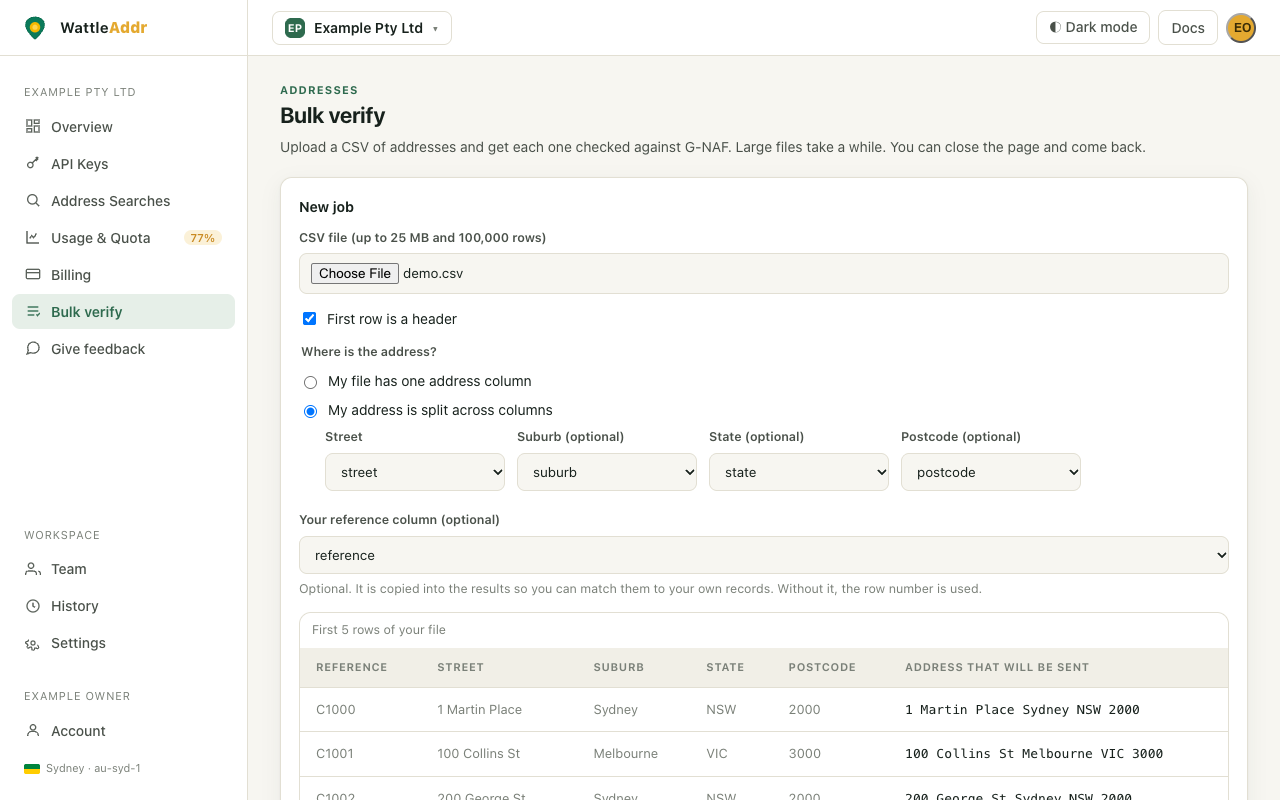
- Check the columns. Under Where is the address?, choose My file has one address column or My address is split across columns. WattleAddr guesses the columns. Change them if the guess is wrong. Tick or untick First row is a header to match your file. You can also pick a Your reference column, and it is returned with each result. The table shows the first rows of your file and the address that will be sent.
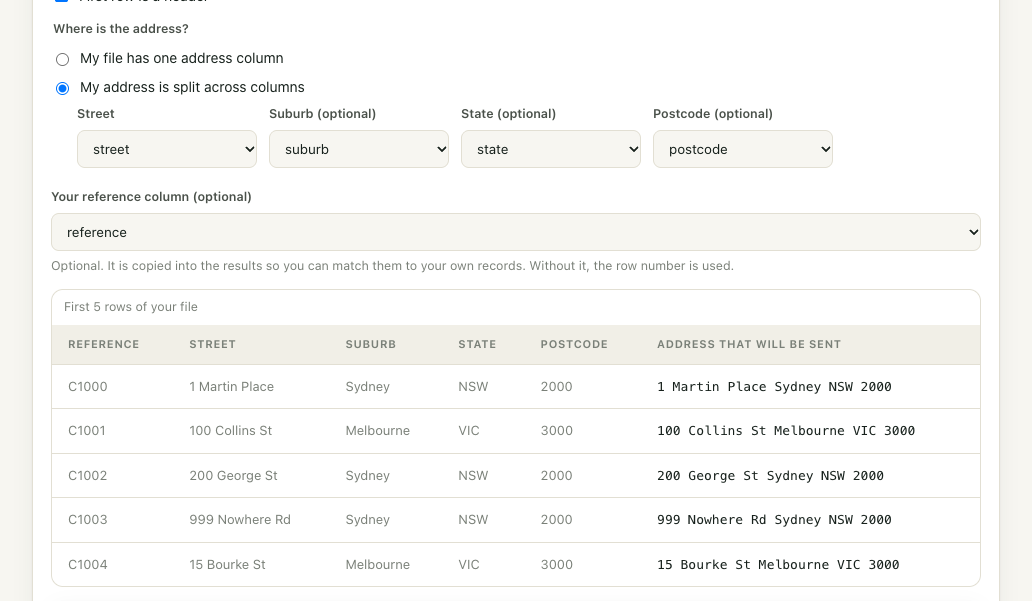
- Read Before you start. It shows how many rows are in the file and what your plan includes. You pay for the rows that match, so the final cost is known only when the job has run.
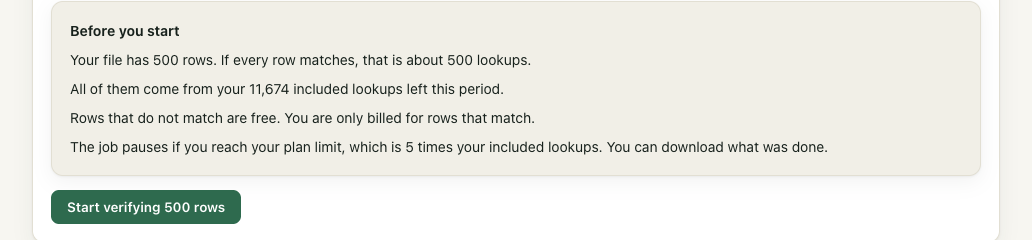
- Choose Start verifying. The job runs in the background, so you can close the page and come back.
- Watch the progress. The job shows rows processed, rows matched, lookups used and a count of each verdict.
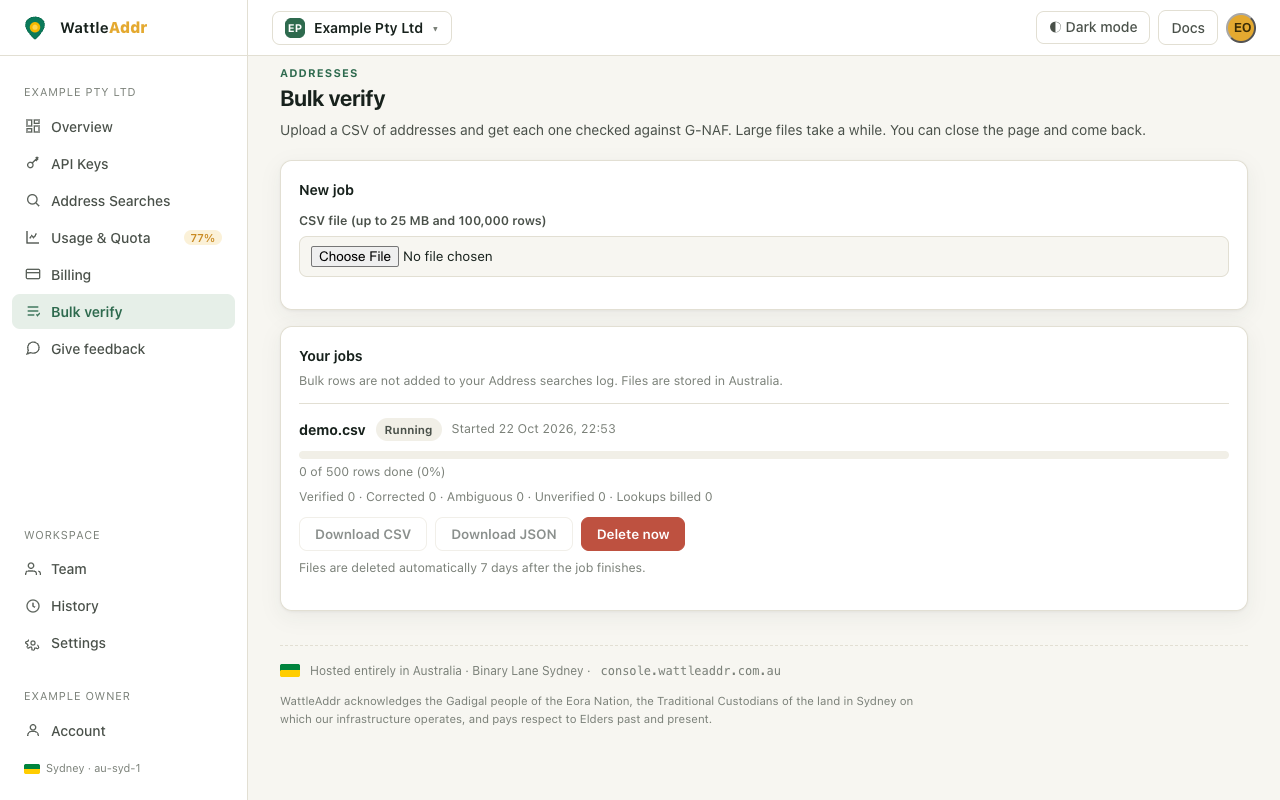
- Under Your jobs, choose Download CSV or Download JSON when the job is complete. Each matched row also has the official address and its coordinates. You can also download part of the results while it is still running or paused.
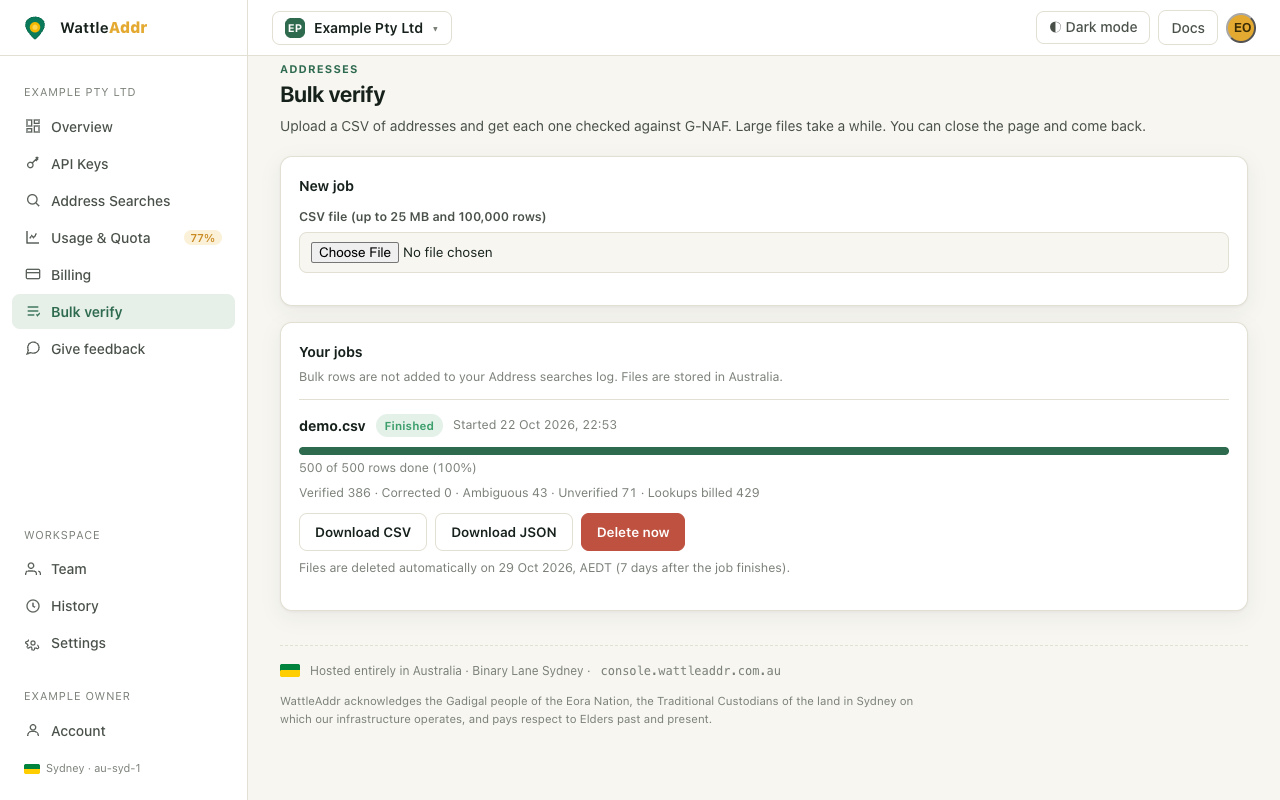
- Choose Delete now when you have the file. If you do not, it is deleted 7 days after the job finishes.
The job runs in the background at a limited rate and gives way to live lookups.
CSV templates
The first row is the column names. These addresses are examples.
id,address
1,100 Collins St Melbourne VIC 3000
2,1 Martin Pl Sydney NSW 2000
id,street,suburb,state,postcode
1,100 Collins St,Melbourne,VIC,3000
2,1 Martin Pl,Sydney,NSW,2000
With no column named, the API and the console look for a column called address, full_address or street_address. Failing that they look for street, suburb (or locality), state and postcode columns. If they cannot decide, the API returns 400 columns_required.
API: up to 100 addresses in one call
POST /v1/addresses/verify/batch takes 1 to 100 addresses and answers in the same call. Each address is a string, or an object with your own id and an address. It needs a secret key. A publishable key gets 403 forbidden_key_type.
curl
curl "https://api.wattleaddr.com.au/v1/addresses/verify/batch" \
  -H "Authorization: Bearer YOUR_SECRET_KEY" \
  -H "Content-Type: application/json" \
  -d '{"addresses": [
    {"id": "cust-1001", "address": "100 collins st melbourne"},
    "1 martin pl sydney nsw 2000"
  ]}'
{
"results": [
{ "index": 0, "id": "cust-1001", "matched": true, "verdict": "corrected",
"match_score": 75, "billed": true, "match": { "formatted": "100 Collins St, Melbourne VIC 3000", "...": "..." },
"...": "the same fields as /v1/addresses/verify" },
{ "index": 1, "matched": true, "verdict": "verified", "billed": true, "...": "..." }
],
"summary": { "total": 2, "matched": 2, "billed": 2, "not_processed": 0 }
}Each result has the fields of a verify response, plus its index in your list and your id if you sent one. The summary counts the addresses sent, the ones that matched, the ones billed, and the ones not processed. An address that could not be checked comes back with an error object (quota_exceeded or engine_error) and billed: false. If the very first lookup is already over your limit, the whole call returns 402 quota_exceeded. Batch calls are never written to the search log.
JavaScript (fetch, Node 20)
const res = await fetch('https://api.wattleaddr.com.au/v1/addresses/verify/batch', {
  method: 'POST',
  headers: {
    Authorization: `Bearer ${process.env.WATTLEADDR_SECRET_KEY}`,
    'Content-Type': 'application/json',
  },
  body: JSON.stringify({
    addresses: [
      { id: 'cust-1001', address: '100 collins st melbourne' },
      '1 martin pl sydney nsw 2000',
    ],
  }),
});
if (!res.ok) throw new Error((await res.json()).error.message);
const { results, summary } = await res.json();
for (const r of results) console.log(r.index, r.id, r.verdict ?? r.error?.code);
console.log(summary); // total, matched, billed, not_processed
Python (requests)
import os
import requests

res = requests.post(
    "https://api.wattleaddr.com.au/v1/addresses/verify/batch",
    headers={"Authorization": f"Bearer {os.environ['WATTLEADDR_SECRET_KEY']}"},
    json={"addresses": [
        {"id": "cust-1001", "address": "100 collins st melbourne"},
        "1 martin pl sydney nsw 2000",
    ]},
    timeout=60,
)
res.raise_for_status()
body = res.json()
for r in body["results"]:
    print(r["index"], r.get("id"), r.get("verdict") or r["error"]["code"])
print(body["summary"])  # total, matched, billed, not_processed
API: a job for a whole file
For a file of up to 100,000 rows, create a job. Send the file as text/csv with query parameters, or send JSON.
| Parameter | What it does |
|---|---|
filename | A label for the job. Optional. |
has_header | true by default. Use false if the first row is an address. |
address_column | The column that holds the whole address. A header name, or a number from 1 if there is no header. |
columns | A comma list such as street,suburb,state,postcode. The columns are joined with spaces in that order. |
id_column | The column that holds your own row reference. It is returned with each result. Optional, and the default is the row number. |
For a JSON body, send {"addresses": [ ... ]} where each item is a string, an object with id and address, or an object with id, street, suburb, state and postcode. The job is created with 202 and the job object below. Poll GET /v1/batch-jobs/{id} for its status.
curl
# 1. Create the job from a CSV file
curl -X POST "https://api.wattleaddr.com.au/v1/batch-jobs?filename=customers.csv&address_column=address&id_column=id" \
  -H "Authorization: Bearer YOUR_SECRET_KEY" \
  -H "Content-Type: text/csv" \
  --data-binary @customers.csv

# 2. Poll until status is completed (or paused)
curl "https://api.wattleaddr.com.au/v1/batch-jobs/JOB_ID" \
  -H "Authorization: Bearer YOUR_SECRET_KEY"

# 3. Download the results (csv is the default; format=json also works)
curl "https://api.wattleaddr.com.au/v1/batch-jobs/JOB_ID/results?format=csv" \
  -H "Authorization: Bearer YOUR_SECRET_KEY" -o results.csv

# 4. Delete the files when you have them
curl -X DELETE "https://api.wattleaddr.com.au/v1/batch-jobs/JOB_ID" \
  -H "Authorization: Bearer YOUR_SECRET_KEY"
{
  "id": "JOB_ID",
  "status": "running",
  "pause_reason": null,
  "failure_reason": null,
  "filename": "customers.csv",
  "total_rows": 10000,
  "processed_rows": 2400,
  "matched_rows": 2280,
  "billed_lookups": 2280,
  "verdicts": { "verified": 1500, "corrected": 600, "ambiguous": 180, "unverified": 120 },
  "created_at": "...", "started_at": "...", "finished_at": null, "expires_at": null,
  "stored_in": "au-syd-1",
  "results_available": true
}
status is queued, running, paused, completed, failed, expired or deleted. A paused job has a pause_reason, and a failed one has a failure_reason. See pausing and resuming.
The CSV results have these columns, in this order: row_id, input_address, verdict, matched, formatted_address, gnaf_id, latitude, longitude, flat_number, level_number, street_number, street_name, street_type, street_suffix, locality, state, postcode, match_score, billed, notice. The notice column is empty or a code such as postal_address_unsupported, address_missing or address_too_long. With format=json each row has the same match object as a verify response.
JavaScript (fetch, Node 20)
const base = 'https://api.wattleaddr.com.au/v1';
const headers = { Authorization: `Bearer ${process.env.WATTLEADDR_SECRET_KEY}` };
import { readFile, writeFile } from 'node:fs/promises';

// 1. Create the job from a CSV file
const created = await fetch(`${base}/batch-jobs?filename=customers.csv&address_column=address&id_column=id`, {
  method: 'POST',
  headers: { ...headers, 'Content-Type': 'text/csv' },
  body: await readFile('customers.csv'),
});
if (created.status !== 202) throw new Error((await created.json()).error.message);
let job = await created.json();

// 2. Poll. A paused job resumes by itself, so stop on completed or failed only.
while (!['completed', 'failed', 'expired', 'deleted'].includes(job.status)) {
  await new Promise((r) => setTimeout(r, 10_000));
  job = await (await fetch(`${base}/batch-jobs/${job.id}`, { headers })).json();
  console.log(job.status, job.processed_rows, '/', job.total_rows, job.pause_reason ?? '');
}

// 3. Download the results
const out = await fetch(`${base}/batch-jobs/${job.id}/results?format=csv`, { headers });
await writeFile('results.csv', Buffer.from(await out.arrayBuffer()));

// 4. Delete the files
await fetch(`${base}/batch-jobs/${job.id}`, { method: 'DELETE', headers });
Python (requests)
import os
import time
import requests

base = "https://api.wattleaddr.com.au/v1"
headers = {"Authorization": f"Bearer {os.environ['WATTLEADDR_SECRET_KEY']}"}

# 1. Create the job from a CSV file
with open("customers.csv", "rb") as f:
    created = requests.post(
        f"{base}/batch-jobs",
        params={"filename": "customers.csv", "address_column": "address", "id_column": "id"},
        headers={**headers, "Content-Type": "text/csv"},
        data=f,
    )
created.raise_for_status()
job = created.json()

# 2. Poll. A paused job resumes by itself, so stop on completed or failed only.
while job["status"] not in ("completed", "failed", "expired", "deleted"):
    time.sleep(10)
    job = requests.get(f"{base}/batch-jobs/{job['id']}", headers=headers).json()
    print(job["status"], job["processed_rows"], "/", job["total_rows"], job["pause_reason"] or "")

# 3. Download the results
out = requests.get(f"{base}/batch-jobs/{job['id']}/results", params={"format": "csv"}, headers=headers)
out.raise_for_status()
with open("results.csv", "wb") as f:
    f.write(out.content)

# 4. Delete the files
requests.delete(f"{base}/batch-jobs/{job['id']}", headers=headers)
The other errors are bad_request, too_many_rows, file_too_large, too_many_jobs, feature_unavailable, not_available_on_shopify, bulk_unavailable, not_found and results_not_available. Each comes in the usual { "error": { "code", "message", "docs" } } shape.
What each verdict means
These are the same meanings as a single verify call.
verdict | Meaning | Handling |
|---|---|---|
verified | Every element you supplied agrees, and no other candidate fits | Accept |
corrected | Agrees as far as it goes. You abbreviated or left something out | Accept the official form |
ambiguous | An element was contradicted, input was discarded, a runner-up fits equally well, or you gave a building address and the building has units | Review. Never accept automatically |
unverified | Nothing matched, or the match scored too low to rely on | Reject and flag |
A verified address exists in G-NAF and we know where it is. That is not a promise that Australia Post will deliver to it.
PO Boxes are not supported, because G-NAF holds physical addresses only. A PO Box row comes back unmatched with the notice postal_address_unsupported, and it is not charged.
What it costs
Each address that matches is one lookup, the same as a call to /v1/addresses/verify. Rows that do not match are free. Lookups come from your plan’s included lookups first. After that they are billed at your plan’s overage rate, which is on the pricing page, GST included. Each row counts on its own, so the same address twice in a file, matching twice, is two lookups. An unverified row that still returned a match is billed, as with a single verify. The billed column says which. A test key runs jobs that bill nothing.
| Example | Lookups |
|---|---|
| 10,000 rows, 9,400 of them match | 9,400 lookups. The other 600 rows are free. |
| The same file, on a plan with 5,000 included lookups left | The first 5,000 come from your included lookups. The other 4,400 are billed at your plan’s overage rate. |
| The same file, on the Free plan with 5,000 lookups left | The job pauses after 5,000 lookups and nothing is charged. You can download the partial results. It carries on after you upgrade or when the next billing period starts. |
The usual limits apply. The Free plan stops at its allowance. Starter and Growth pause overage at five times their included lookups unless we have set a spending cap at your request.
Limits
- 100 addresses in one synchronous call.
- 100,000 rows and 25 MB in one job.
- 2 unfinished jobs at a time in a workspace.
- Through the API it needs a secret key. A publishable key gets
403 forbidden_key_type. - Your plan must include verify. Every plan does, including Free inside its allowance.
- Not available to workspaces billed through Shopify. Those get
403 not_available_on_shopify. - PO Boxes, Locked Bags and Private Bags are not supported, because G-NAF holds physical addresses only.
Pausing and resuming
A job pauses part way instead of running up a bill. It pauses when the workspace reaches its limit: the Free allowance, the overage ceiling or a spending cap we set at your request. The job shows the reason in pause_reason: quota_reached, overage_paused, plan_changed or engine_unavailable. You can download the partial results while it is paused.
The job carries on by itself when the workspace can serve lookups again. That is after an upgrade, after the limit is lifted, or when the next billing period starts. A job that stays paused for 30 days is stopped, and its failure_reason is paused_too_long.
Your files
- The file you upload and the results file are deleted 7 days after the job finishes. Choose Delete now in the console, or call
DELETE /v1/batch-jobs/{id}, to delete them at once. - The rows are not written to the search log that you see under Address searches.
- The files are stored in Australia, on the local disk of the server that runs the job. They are not kept in the app database, and they are used for nothing else.
- A job’s files exist on one server only, Sydney or Melbourne. If service has moved to our other server, results stored on the first server are fetched from it when it is reachable. If it is not, the download says so and you can try again later.
The Terms and the Privacy Policy cover how we handle the files. For an overview of the feature, see bulk address verification. For a single address, see address verification.