Every address field from autocomplete, in one call
7 Nov 2026 · 4 min read
Here is what is live today, 7 November 2026.
What is live
Add `detail=full` to an address autocomplete call and each suggestion carries the same record a retrieve returns: components, geo, confidence, source and the G-NAF release. You can store the address straight from the suggestion and skip the second call.
Sample response. The score and coordinates are placeholders; a real call returns the address’s own. The first call in a new session returns the record and bills the session as one lookup. The `components` object is trimmed here and has the same parts as a retrieve.
GET /v1/addresses/autocomplete?q=33+hib&session=abc123&detail=full

{
  "session": "abc123",
  "query": "33 hib",
  "suggestions": [
    {
      "id": "GAACT717000002",
      "formatted": "Shop 29, 33 Hibberson St, Gungahlin ACT 2912",
      "score": 40,
      "components": { … trimmed },
      "geo": {
        "lat": -35.3,
        "lng": 149.1
      },
      "confidence": "high",
      "source": "gnaf",
      "gnaf_release": "2026-08"
    }
  ],
  "billed": true
}
The same call again in the same session returns the same suggestion and `billed` is `false`. The suggestion is trimmed here.
GET /v1/addresses/autocomplete?q=33+hib&session=abc123&detail=full

{
  "session": "abc123",
  "query": "33 hib",
  "suggestions": [ … the same suggestion, trimmed ],
  "billed": false
}
A `session` is required. A search shows at most 5 suggestions in this mode.
How to switch it on
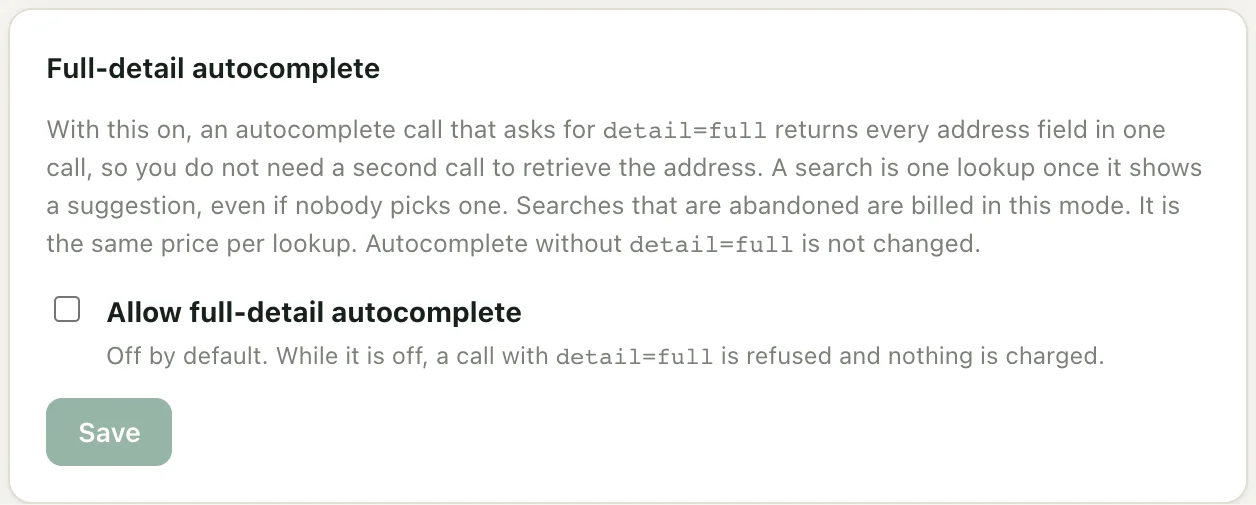
An owner or admin signs in to the console, opens Settings and ticks Allow full-detail autocomplete in the Full-detail autocomplete box. It is off by default. While it is off, `detail=full` returns a 403 and nothing is charged. Every plan can use it, including Free. Shopify plans cannot.
What it costs
The price per lookup is the same as it is today. The billing is different. With `detail=full`, a search session is one lookup the first time it returns at least one suggestion, whether or not anyone picks one.
That means an abandoned search is billed in this mode, so the same traffic can cost more than it does with default autocomplete.
Here is an example, with numbers we chose. It is not a measured figure. On Starter, say 70,000 searches end in a pick in a month, and 30% of the searches that show suggestions are abandoned. Default autocomplete bills 70,000 lookups, which is $108.90 including GST. Full detail bills 100,000 lookups, which is $191.40 including GST. Your abandonment share will be different, so count it before you switch.
Later calls in the same session, and a retrieve in it, are usually not billed again. A session covers calls for up to 10 minutes, and up to 50 calls that return suggestions, counting the call that was billed, after it is first billed. After that, the next call that returns a suggestion is a new lookup.
When to stay on the default
- Many of your searches are abandoned. The default two calls stay the cheapest, because an abandoned search is not billed.
- You use the widget, the SDK widget or the Shopify app. They keep using autocomplete and retrieve, so their bills do not change.
- You want the most suggestions per call. Default autocomplete returns up to 20.
Limits
- A full-detail call is refused, with nothing charged, whenever your workspace’s billable requests are refused under quotas and overage, even in a session already billed. Default autocomplete keeps working.
- Test keys are never billed.
- A call that returns no suggestions is not billed.
The full guide, with a comparison of the two setups, is at autocomplete with full detail. The parameters are in the docs, and prices are on the pricing page.