Reverse geocoding API for Australia
Send a latitude and longitude, and WattleAddr returns the nearest street address. The addresses are G-NAF, the national address file, and the API is hosted in Australia. This page is for someone who has never used an API.
What you need
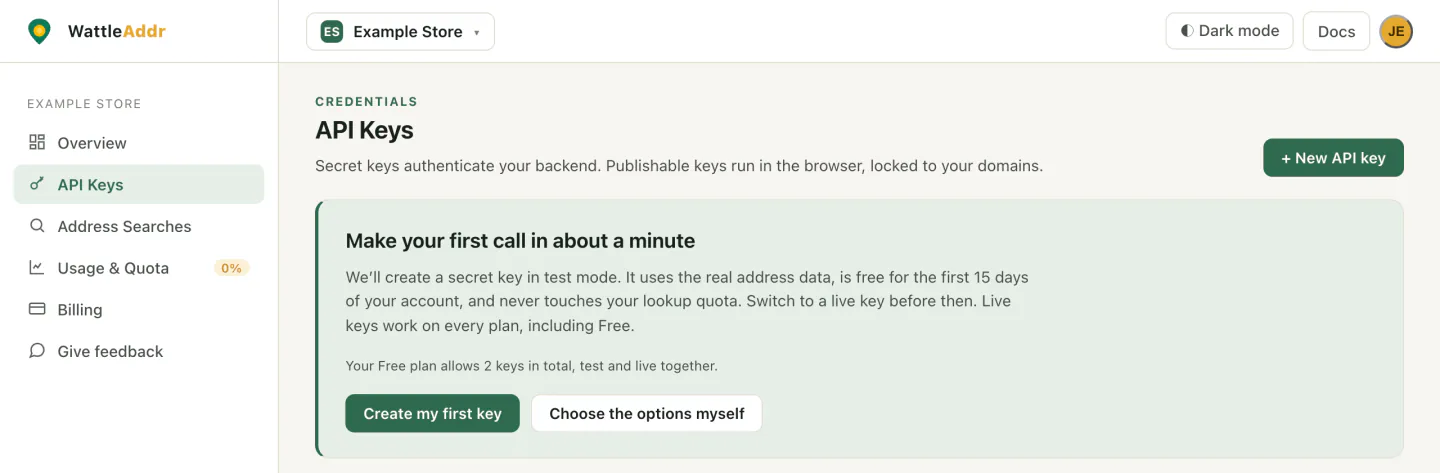
- A WattleAddr account and a secret key. Sign up on the sign-up page (console.wattleaddr.com.au/signup). It is free and needs no card. In the console, open API Keys in the left menu and press Create my first key. Copy the key when it appears. The console shows it once. A test key starts
waddr_sk_test_while test mode lasts. It uses the real address data and is never charged. Test mode works for the first 15 days of your account. - A server. This can be your own computer while you try it out.
Why the key stays on a server. Anyone who can open a web page or an app can read what is inside it. Anyone with your secret key can spend your lookups. Reverse geocoding only works with a secret key. A publishable key gets 403 forbidden_key_type. The step by step version of getting a key is in Step 1 of the quickstart.
Latitude and longitude in 30 seconds
Latitude and longitude are two numbers that name a spot on Earth. Latitude says how far north or south you are. Longitude says how far east or west. Australia is south of the equator, so Australian latitudes are negative. Australian longitudes are positive.
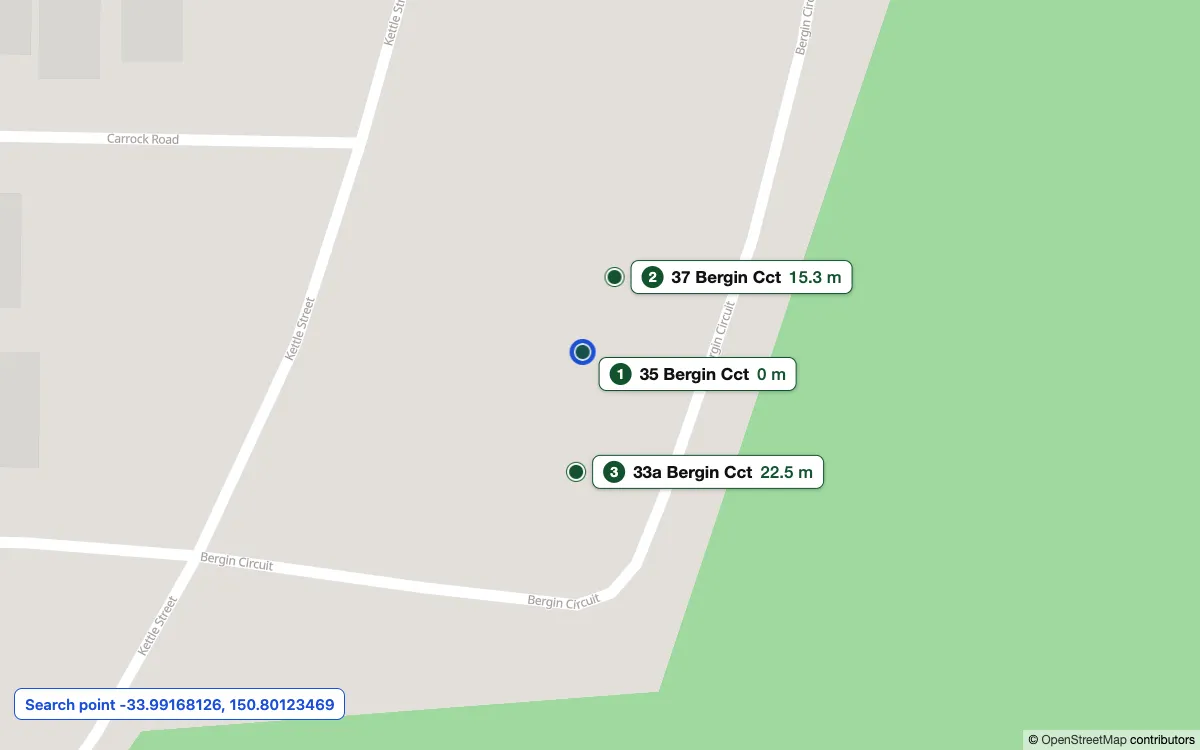
Example: -33.99168126, 150.80123469 is a point in Leppington, New South Wales. Latitude comes first.
Positions come from:
- a phone’s GPS;
- the browser, with
navigator.geolocation.getCurrentPosition, after the person allows it; - a click on a map;
- a vehicle tracker.
Your first call in 5 minutes
You need a terminal. These commands are for macOS, Linux, or Windows with WSL.
- Save your key in an environment variable called
WATTLEADDR_KEY. Replace the example with your own key.export WATTLEADDR_KEY=waddr_sk_test_your_key_here - Copy and paste this call.
curl -s -H "Authorization: Bearer $WATTLEADDR_KEY" \ "https://api.wattleaddr.com.au/v1/addresses/reverse?lat=-33.99168126&lng=150.80123469&radius=100&limit=3" - You get the nearest addresses back as JSON, nearest first.
{
  "addresses": [
    {
      "id": "GANSW720007107",
      "formatted": "35 Bergin Cct, Leppington NSW 2179",
      "components": {
        "flat_number": null, "level_number": null,
        "street_number": "35", "street_name": "Bergin", "street_type": "Circuit", "street_suffix": null,
        "locality": "Leppington", "state": "NSW", "postcode": "2179"
      },
      "geo": { "lat": -33.99168126, "lng": 150.80123469 },
      "confidence": "high",
      "distance_m": 0
    },
    {
      "id": "GANSW720006300",
      "formatted": "37 Bergin Cct, Leppington NSW 2179",
      "components": { … },
      "geo": { "lat": -33.99155496, "lng": 150.80129962 },
      "confidence": "high",
      "distance_m": 15.3
    },
    {
      "id": "GANSW720684251",
      "formatted": "33a Bergin Cct, Leppington NSW 2179",
      "components": { … },
      "geo": { "lat": -33.99188327, "lng": 150.80122153 },
      "confidence": "high",
      "distance_m": 22.5
    }
  ],
  "source": "gnaf",
  "gnaf_release": "2026-08",
  "billed": false,
  "test": true
}
What each field means:
| Field | What it is |
|---|---|
addresses | The nearest addresses, nearest first. The list is empty when we find no address within your radius. |
formatted | The address as one line, ready to show. |
components | The same address in separate parts: street number, street name, suburb, state and postcode. |
geo | The latitude and longitude of the address point. |
distance_m | How far the address is from your point, in metres. |
gnaf_release | The G-NAF release that answered. |
billed | true when this call used one lookup from your plan. false on a test key, when nothing came back, or when we could not check your usage. |
test | Present, and true, only on a test key. Nothing is charged on one. |
The two shortened components objects have the same fields as the first.
From a phone or web page to an address
The phone or web page knows where the person is. Only your server may hold the secret key. So the page sends the position to your server, and your server calls WattleAddr.
- The browser or phone sends its latitude and longitude to your server.
- Your server asks WattleAddr for the nearest address, using the secret key.
- WattleAddr sends the nearest addresses back to your server.
- Your server returns the nearest address to the browser or phone.
A working example in Node.js (Express)
This is a web page with one button, and a server that answers it. It was run in Docker on Node.js 22 against a recorded response. It handles a person who blocks location, a position with no address nearby, and errors. You need Node.js 22 or newer.
This page collects a person’s location. Ask for it only when they press the button, as this example does. Tell them why you need it and what you keep. Under our Terms, your Privacy Act obligations to your own users stay with you.
- Make a new folder called
where-am-iand open a terminal in it. Run every command below in this folder. First runnpm init -yand thennpm install express@5. - Save this as
index.htmlin the folder.
<!doctype html>
<html lang="en">
<head>
  <meta charset="utf-8">
  <meta name="viewport" content="width=device-width, initial-scale=1">
  <title>Where am I?</title>
</head>
<body>
  <button id="go">Show my address</button>
  <p id="result" role="status"></p>

  <script>
    const button = document.getElementById("go");
    const result = document.getElementById("result");

    button.addEventListener("click", () => {
      if (!navigator.geolocation) {
        result.textContent = "This browser cannot share your location.";
        return;
      }
      result.textContent = "Finding your position...";

      navigator.geolocation.getCurrentPosition(
        async (position) => {
          try {
            // Send the position to your own server. The secret key stays there.
            const res = await fetch("/where-am-i", {
              method: "POST",
              headers: { "Content-Type": "application/json" },
              body: JSON.stringify({ lat: position.coords.latitude, lng: position.coords.longitude }),
            });
            const data = await res.json();
            result.textContent = res.ok ? "You are near " + data.address : data.message;
          } catch (e) {
            result.textContent = "Could not reach the server. Try again.";
          }
        },
        (error) => {
          result.textContent = error.code === error.PERMISSION_DENIED
            ? "Location is blocked. Allow it for this site in your browser, then press the button again."
            : "Could not get your position. Try again.";
        },
        { enableHighAccuracy: true, timeout: 15000 }
      );
    });
  </script>
</body>
</html>
- Save this as
server.mjsin the same folder.
// server.mjs. Tested on Node.js 22 with Express 4 and 5 (npm install express@5).
// Run: WATTLEADDR_KEY=your_secret_key node server.mjs
import express from "express";

const API = "https://api.wattleaddr.com.au";
const app = express();
app.use(express.json());

// Show the page.
app.get("/", (req, res) => {
  res.sendFile("index.html", { root: import.meta.dirname });
});

// The page posts the browser's position here.
app.post("/where-am-i", async (req, res) => {
  const lat = Number(req.body?.lat);
  const lng = Number(req.body?.lng);
  if (!Number.isFinite(lat) || !Number.isFinite(lng) || Math.abs(lat) > 90 || Math.abs(lng) > 180) {
    return res.status(400).json({ message: "We did not get a usable position. Try again." });
  }

  const key = process.env.WATTLEADDR_KEY;
  if (!key) {
    console.error("Set WATTLEADDR_KEY to your secret key.");
    return res.status(500).json({ message: "This server is not set up yet." });
  }

  try {
    // 100 metres suits a phone's GPS. limit 1 asks for the single nearest address.
    const query = new URLSearchParams({ lat, lng, radius: 100, limit: 1 });
    const api = await fetch(API + "/v1/addresses/reverse?" + query, {
      headers: { Authorization: "Bearer " + key },
      signal: AbortSignal.timeout(10000),
    });
    const data = await api.json().catch(() => ({}));

    if (!api.ok) {
      // Log the status and code. Do not log the position, and do not send the API's message to the browser.
      console.error("WattleAddr:", api.status, data.error?.code);
      return res.status(502).json({ message: "We could not look up your address. Try again in a moment." });
    }
    if (data.addresses.length === 0) {
      // Nothing within 100 metres. This is not an error, and it is not charged.
      return res.status(404).json({ message: "No address found within 100 metres of you." });
    }
    res.json({ address: data.addresses[0].formatted, distance_m: data.addresses[0].distance_m });
  } catch (e) {
    console.error("WattleAddr:", e.name);
    res.status(502).json({ message: "We could not look up your address. Try again in a moment." });
  }
});

app.listen(3000, () => console.log("Open http://localhost:3000"));
- Set your key as in the first call, then run
node server.mjs. In Windows PowerShell, set the key with$env:WATTLEADDR_KEY="waddr_sk_test_your_key_here"and then runnode server.mjs. If port 3000 is busy, change 3000 inserver.mjsand in the address you open. - Open
http://localhost:3000and press the button. Your browser asks to share your location. The browser only offers this onhttpspages or onlocalhost, so plainhttp://localhost:3000works for a first try.
A computer without GPS can be less exact than a phone, so the address may not be the one you expect. For the same call in Python or PHP, see the Python and PHP guides. The Node.js guide has the same call as a small module.
Choosing radius and limit
radius is how far to look, in metres, from 1 to 2000. limit is how many addresses to return, from 1 to 10.
| You want | Try |
|---|---|
| The address of a GPS fix | radius=100. This is the default. |
| A rural point, where addresses are far apart | A larger radius, such as radius=1000. |
| “What address is this?” | limit=1. This is the default. |
| “Pick from nearby” | limit=5, up to limit=10. |
A value outside its range returns 400 bad_request. We do not adjust it for you.
What it costs
Every call that returns at least one address is one lookup, from the same monthly allowance as the other endpoints. A call that returns no address is never billed. A session does not stop a repeat reverse call from being billed. A retrieve in the same session within an hour of a billed reverse call is normally not billed again. Test keys are never billed. If you retry after your own timeout, the retry can be billed as another lookup.
Reverse geocoding is on every plan, including Free. The prices and allowances are on the pricing page.
Good to know
- Nearest is the nearest address point. It means the nearest G-NAF address point. A neighbour’s point can be nearer than the property someone is standing on, so the result is not proof of where a person is. Addresses that G-NAF places only at the middle of their street or suburb are left out, because G-NAF has no point for the property itself.
- The data is a release. Results come from the G-NAF release we serve. An address that G-NAF has since retired can still appear.
- The coordinate is the G-NAF geocode. It is usually the property centroid. It is not a promise that mail can be delivered, or that it is the building’s door.
Privacy
We do not keep the coordinates, or the address we find, in usage records or search logs. The usage record keeps the type of call, the time, the key and session, how many addresses came back, how long it took, the status code, the G-NAF release and whether it was billed. If a request fails at our web server, the request line, including the coordinates, can appear in that server’s error log. We keep that log for no longer than 16 days. See the Privacy Policy.
Common problems
If the address data cannot be reached, you get 503 engine_unavailable and nothing is charged.
| Status | code | What happened | What to do |
|---|---|---|---|
| 400 | bad_request | The query (q) or address is under 3 characters, or over the length limit. For suburb and postcode search the minimum is 2 characters, and session is required. Suburb verify needs at least two of suburb, state and postcode. On reverse geocoding, lat, lng, radius or limit is missing, is not a plain number, or is outside its range. The values are not adjusted. | Wait until the person has typed 3 characters before calling address search, or 2 for suburb and postcode search. Trim very long input. For reverse geocoding, send lat from -90 to 90, lng from -180 to 180, radius from 1 to 2000 and limit from 1 to 10. |
| 400 | invalid_ref | The customer reference (the X-WattleAddr-Ref header or the ref query parameter) is longer than 64 characters or has a character other than letters, digits and . _ : - (so no @ and no spaces). Nothing was charged. | Send your own ID for the customer, not a name or an email address. Or leave the reference out: it is optional. |
| 401 | unauthorized | No API key was sent. | Add an Authorization: Bearer YOUR_KEY header (secret key), or ?key= for a publishable key in the browser. |
| 401 | invalid_key | The key is wrong, has been revoked, or has a typo. | Copy it again from the console, or create a new key. Revoked keys never come back. |
| 402 | quota_exceeded | This month’s lookups are used up and your plan does not run over (Free, Shopify, a cancelled plan, a paid plan with a spending cap set at your request, or a paid plan whose owner chose to stop at the allowance in Settings), or a paid plan has reached the overage ceiling of five times its included lookups. The message says which. | Wait for the period to roll over. On the Free plan, upgrade in the console under Billing. If the message says the workspace is set to stop at its allowance, the owner can allow overage under Settings. If the message says the overage ceiling was reached, contact support to lift it; a plan change only takes effect next period. Address autocomplete keeps working. Suburb and postcode autocomplete is refused too, because it can be charged. |
| 402 | test_mode_expired | A test key was used after the free test period (15 days from account creation). | Create a Live key in the console. Live keys work on every plan, including Free. The one exception is the suburb and postcode API, which needs a paid plan on a live key. |
| 403 | forbidden_referrer | A publishable key was used from a domain that is not on its allowed list. | Edit the key in the console and add the domain to Allowed domains. Match the exact host the page is served from. |
| 403 | forbidden_key_type | A publishable (browser) key was used to call verify (address or suburb), reverse geocoding or the usage endpoint. Publishable keys can only call autocomplete and retrieve. | Call verify or reverse geocoding from your server with a secret key. If a person is typing the address, use autocomplete and retrieve with the publishable key. Verify is for addresses you already hold. Usage is for your server too. |
| 403 | forbidden_ip | A secret key was used from an IP address that is not on its allowed list. | Edit the key in the console and add the address to Allowed IPs / CIDRs, or clear the list to allow any IP. |
| 429 | rate_limited | Too many requests per second on one key. | Wait the number of seconds in the Retry-After header, then retry. Debounce keystrokes in the browser. |
| 503 | service_unavailable | We cannot reach our own database, so we cannot check this key or your usage right now. GET /v1/usage returns it too when usage cannot be read, including usage by customer reference before that is available on the server. Nothing was charged for a request that stops here. This is never a 401: the key may be fine. If it happens part way through a batch, the response lists the rows already processed, and billed shows which of them were charged. | Wait the number of seconds in the Retry-After header (30), then retry. Do not create a new key. After a batch that stopped part way, retry only the rows that were not returned, and any returned with engine_error. |
| 503 | engine_unavailable | The suburb and postcode data or the address data is not available on this server. Nothing was charged. | Wait a few seconds and retry. If it keeps happening, check wattleaddr.com.au/status. |
Next steps
- The reverse geocoding reference and the API reference.
- The full list of errors.
- The language guides: Node.js, Python and PHP.
- Does the person type the address? Use autocomplete instead.